Shopify website development cost depends on project scope, storefront complexity, data, integrations, and ongoing operating needs rather than page count alone.
Expect professional theme-based builds to start around 3,000–8,000, with custom, migration-heavy, Shopify Plus, and headless projects priced significantly higher.
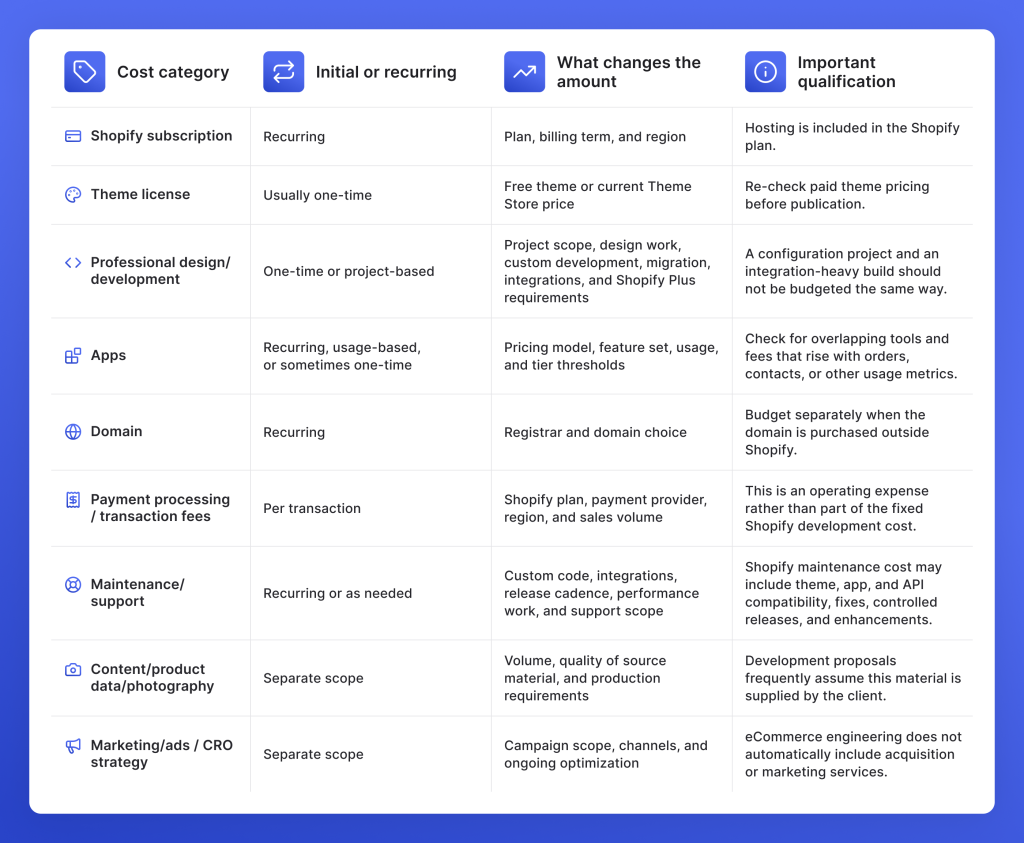
Separate the build quote from first-year costs such as Shopify fees, apps, payments, support, and maintenance.
Use an existing theme when it fits the required experience; choose custom development when the store needs bespoke UX, product logic, or integrations.
Compare quotes by scope, exclusions, QA, ownership, and recurring costs instead of the headline price.
Keep migration, tracking, performance, accessibility, and post-launch support in scope to avoid expensive rework later.
What you’re really paying for with Shopify
Shopify website development cost can start with a lean theme-led setup and climb into the tens of thousands for custom development, complex integrations, Shopify Plus, or headless architecture. The build itself is only one part of the budget, so a realistic estimate should also account for platform fees and ongoing operating expenses.
In practice, Shopify store development cost has three layers: the Shopify subscription, the one-time implementation work, and the costs that continue after launch. Implementation may cover UX/UI design, theme customization, custom features, migration, integrations, analytics, QA, and launch support. Ongoing costs can include apps, payment or transaction fees, maintenance, support, and future enhancements.
If you are asking how much it costs to build a Shopify website, project scope matters far more than page count. A compact store with ERP integration or multi-market requirements can demand more work than a larger catalog built on a well-matched theme.
Shopify website development cost at a glance
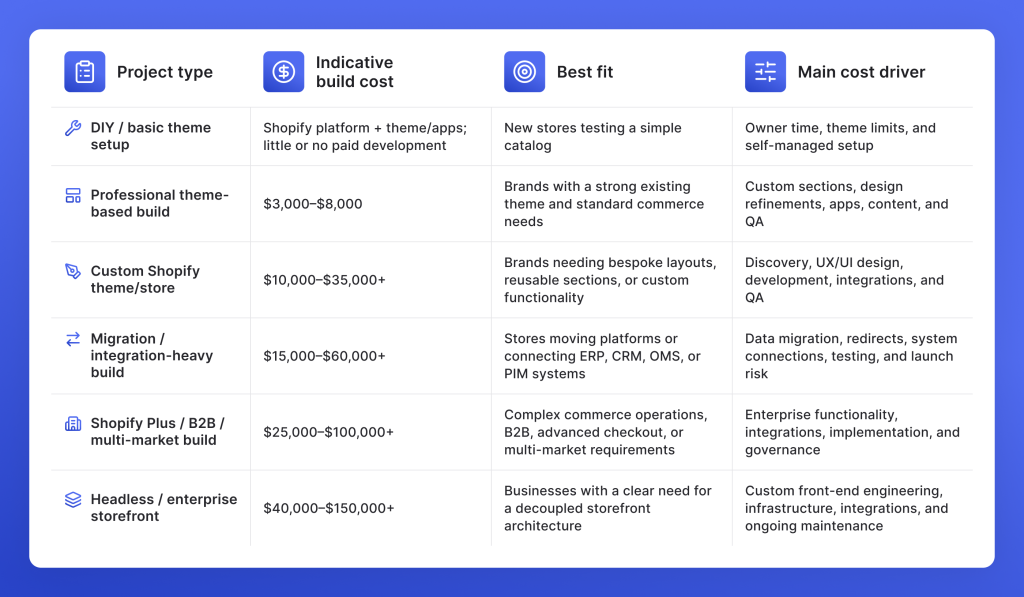
Shopify website development cost changes sharply with the type of project you’re buying. A theme setup with standard commerce features sits in a very different budget bracket than a custom storefront, a data-heavy migration, or a Shopify Plus implementation tied to business systems.
The ranges below are indicative 2026 market bands for professional Shopify work, not GetDevDone quotes. They are useful for early budgeting, while the final estimate depends on the storefront, data, integrations, and operational requirements included in scope.
These bands describe implementation costs. Shopify subscriptions, apps, payment fees, and post-launch support sit outside the build estimate unless a proposal explicitly includes them.
How project complexity affects Shopify build costs
Shopify development cost is better estimated by implementation type than by store size. A catalog with 20 products can require more engineering than one with 2,000 products if it includes subscription rules, custom buying journeys, or ERP synchronization. The useful question is what the storefront, data, and business systems need to do.
Theme-led store launch
A professional theme-led launch generally sits near the lower end of Shopify development budgets, around $3,000–$8,000, when the selected theme already covers the core shopping experience.
This setup works well when the store uses standard product and collection templates, conventional payments and shipping, supplied brand assets and content, and a compact app stack. The scope can still include visual adjustments, product population, analytics setup, responsive QA, and launch support.
That differs from a DIY setup, where the merchant handles configuration, content, testing, and deployment independently.
Costs start going up when the theme needs new templates, substantial layout changes, unusual product behavior, extensive data work, or several custom sections.
Professionally customized Shopify theme
A customized theme makes sense when a solid existing theme covers the foundation but needs meaningful adaptation. Projects in this category often sit toward the upper end of the $3,000–$8,000 professional theme-build range, with larger scopes moving beyond it.
Work may include custom sections, new templates, metafield-driven content, mobile-specific refinements, branded interactions, merchandising features, app integration, and broader QA.
This approach can preserve useful existing theme functionality while directing the budget toward the parts customers actually see and use. It is especially practical when navigation, product structure, cart behavior, and core merchandising already work well in the base theme.
Once the project requires a new component system, bespoke UX across several templates, or custom product behavior that cuts across the storefront, the scope begins to resemble a custom theme build.
Custom Shopify theme or bespoke storefront
A $10,000–$35,000+ market range becomes more relevant when the storefront is designed around requirements an existing theme cannot support cleanly.
A custom project may include approved UX/UI designs, a reusable section and component architecture, several distinct templates, specialized product logic, advanced content patterns, integrations, accessibility requirements, and performance targets. The range assumes that “custom” refers to a genuine product, brand, or operational requirement rather than cosmetic changes that could be handled inside a strong existing theme.
The design process also matters. Building against approved Figma files carries a different scope than defining UX, responsive states, interactions, and the visual system as part of the engagement.
A custom Shopify theme is easier to justify when the storefront needs tighter control over merchandising, storytelling, or reusable content structures that off-the-shelf themes would force into awkward workarounds.
Complex integrations or substantial migration work can move the project into the next cost category.
Shopify migration or integration-heavy build
Migration and integration-heavy projects commonly fall around $15,000–$60,000+ when the scope combines storefront work with data transfer or business-system connections.
A replatform from WooCommerce, Adobe Commerce/Magento, BigCommerce, a custom platform, or an older Shopify implementation can involve products, variants, customers, orders, metafields, media, metadata, URL mapping, redirects, and app replacement. Integrations may connect Shopify with ERP, OMS, CRM, PIM, warehouse, payment, shipping, tax, or marketplace systems.
The visible storefront can be relatively straightforward while the technical scope underneath is substantial. Data mapping, synchronization rules, error handling, reconciliation, tracking validation, and launch QA all require careful planning.
Migration cost can therefore exceed design cost. A broken redirect affects discoverability; incorrect inventory sync can affect orders; incomplete customer or product data can disrupt operations after launch.
A project moves higher within this range when several systems exchange data, legacy records need cleanup, regional commerce rules differ, or launch requires parallel validation across old and new environments.
Shopify Plus, B2B, multi-market, or high-complexity commerce
Implementation budgets around $25,000–$100,000+ are more relevant when Shopify sits inside a complex commerce operation rather than serving as a standalone storefront.
Shopify Plus is not simply a plan for a larger catalog. In 2026, Shopify provides core B2B features across Basic, Grow, Advanced, and Plus, while Plus retains capabilities such as unlimited B2B market catalogs, direct company catalogs, and advanced payment options.
Higher-complexity projects can involve advanced checkout requirements, company-specific B2B experiences, several markets or storefronts, enterprise integrations, Shopify Functions, Flow automation, regional pricing and content, and stricter release governance. Shopify also reserves deeper customization of the information, shipping, and payment stages of checkout for Plus.
The upper end becomes more plausible when the project combines several of these requirements with migration, custom applications, extensive QA, or coordinated high-volume launches.
Headless Shopify
Headless Shopify typically enters the $40,000–$150,000+ range when the business has a concrete reason to separate the storefront front-end from Shopify’s commerce back-end.
That architecture can provide greater control over the front-end and technology stack, with Shopify supporting tools such as Hydrogen and Oxygen as well as Storefront APIs.
The trade-off is broader engineering ownership. The project may require dedicated front-end development, CMS work, API integration, caching, deployment architecture, monitoring, and ongoing maintenance beyond a standard Shopify theme.
Headless is therefore best reserved for requirements that justify that additional architecture, such as specialized digital experiences or a broader composable stack. Store growth by itself does not create that need.
8 factors that affect Shopify website development cost
Two Shopify stores with a similar page count can carry very different development budgets. The real workload sits deeper: in the design system, product data, integrations, regional rules, testing demands, and everything that has to work reliably on launch day. These eight factors have a far greater influence on Shopify website development cost than the number of pages in a sitemap.
1. Design readiness, templates, and reusable sections
Shopify website design pricing starts taking shape before a developer writes a line of Liquid.
A project that arrives with approved Figma files, defined responsive states, interaction specs, and a coherent design system has already cleared a substantial piece of the work. If those decisions are still open, the engagement also needs UX thinking, visual design, mobile layouts, component states, and design review before implementation can move cleanly.
The number of unique templates matters more than the number of pages. Fifty pages assembled with a disciplined library of reusable sections and blocks can be lighter to build than ten pages with ten bespoke layouts.
Animations, unconventional responsive behavior, one-off components, and intricate interactions also widen the scope because each needs to be designed, built, tested, and maintained. A thoughtful section library pays off twice: it streamlines development and gives the merchant more freedom to build new pages without returning to a developer for every layout change.
2. Catalog, products, variants, and content data
A large catalog does not automatically create a large implementation bill. A disorderly one can.
Clean SKUs, consistent variants, well-structured collections, predictable metafields, and prepared media make product imports relatively straightforward. Inconsistent naming, missing attributes, duplicate records, unusual option structures, and scattered source data create hours of cleanup and mapping before the storefront can use that information properly.
Bundles, subscriptions, variant-specific imagery, product options, regional availability, and merchandising rules add their own requirements. The team may need to reshape source data, write import routines, configure metafields, build collection rules, or populate content by hand.
That is why Shopify store development cost often hinges on the quality of the catalog model rather than its raw size. Two thousand orderly products can be easier to handle than 200 products carrying years of inconsistent data.
3. Apps vs. custom functionality
A mature Shopify app is often the fastest and least expensive route to a familiar feature. Reviews, subscriptions, loyalty programs, search, and email capture already have established products with proven infrastructure behind them.
The economics become less attractive when several apps duplicate functionality, fees rise with orders or contacts, the UX clashes with the storefront, or the business has to bend its workflow around the software.
That is where custom functionality enters the conversation. It carries a higher initial Shopify development cost and creates an ongoing maintenance obligation, but it gives the business control over behavior, data, integrations, and the customer experience.
The comparison should cover the full ownership picture: subscription fees, implementation effort, vendor dependency, performance, data access, maintenance, and the cost of adapting the feature later. An inexpensive app can remain the smarter choice for years. A custom build earns its place when the requirement is important enough that the compromises start costing more than the convenience.
4. Integrations and data synchronization
Connecting Shopify to an ERP, OMS, CRM, CDP, PIM, warehouse platform, marketplace, payment service, shipping provider, tax system, or analytics stack involves far more than plugging in an API.
Each connection needs rules. Which system owns the data? Which direction does it travel? How often does it sync? What triggers a webhook? What happens after a failed request? How are duplicate records, stale inventory, or conflicting prices resolved?
Authentication, field mapping, retries, error handling, reconciliation, and logging all become part of the implementation. Inventory may need near-real-time updates while product content syncs on a schedule; orders may move in one direction while fulfillment status travels back.
Integration testing then has to prove that those rules survive real operating conditions. That work is why Shopify development cost can rise sharply even when the storefront itself looks relatively simple.
5. Migration and SEO protection
A Shopify migration carries more baggage than a product export and import.
Products, customers, orders, collections, media, metadata, content, and historical records may all need a new home. URLs require mapping, changed paths need 301 redirects, and internal links have to point to the new structure. Metadata and structured data deserve another pass because the new theme may render them differently.
Analytics brings its own checklist. GA4 events, conversion tracking, pixels, consent behavior, and attribution should be validated once the new storefront is live.
These steps increase Shopify migration cost because they protect continuity across data, search visibility, and measurement. They cannot guarantee identical rankings or zero data loss. What they can do is reduce preventable migration damage through deliberate mapping, validation, launch checks, and post-launch review.
6. Markets, languages, currencies, B2B, and checkout requirements
Every new market creates another set of storefront rules to get right.
Shopify Markets can introduce different currencies, languages, catalogs, prices, domains, tax settings, shipping methods, and regional content. Add three markets, and the work does not stop at translating three versions of a page. Product availability, checkout behavior, navigation, pricing, and transactional details may need to be verified separately in each market.
B2B and wholesale can add company-specific catalogs, payment terms, purchasing rules, pricing structures, and account workflows. Checkout customization can introduce another layer of requirements around validation, payment options, delivery behavior, or regional UX.
Shopify Plus development cost becomes especially relevant when the project relies on Plus-specific checkout extensibility, advanced B2B capabilities, automation, or enterprise operations. Each additional rule expands the number of scenarios that need configuration and QA before launch.
7. Performance, accessibility, tracking, and QA
A storefront can look finished long before it is ready to ship.
Core Web Vitals may expose heavy images, excessive scripts, inefficient theme code, or third-party services that need attention. Performance work can involve image handling, lazy loading, script management, code cleanup, and careful review of app behavior.
Accessibility introduces another set of implementation details: semantic markup, keyboard navigation, focus states, form behavior, contrast, labels, and WCAG-oriented testing.
Tracking has to work with the same precision. GA4, eCommerce events, advertising pixels, consent tools, and attribution need validation across the buying journey.
Then comes release QA: responsive layouts, browsers, devices, checkout, integrations, forms, edge cases, and regression testing after fixes. This work raises Shopify website development cost because it requires real engineering and verification hours. It also catches the defects that visual review alone will never reveal.
8. Timeline, launch risk, and post-launch support
A fixed launch date can reshape an otherwise straightforward project.
Seasonal campaigns, product drops, retail events, and contractual deadlines leave less room for delayed content, incomplete catalog data, late approvals, or third-party integration issues. When dependencies slip, teams may need to run workstreams in parallel, revisit completed areas, or compress QA into a narrower release window.
Late change requests carry a similar ripple effect. A new business rule introduced near launch may touch templates, integrations, checkout behavior, analytics, and previously completed testing.
The budget also continues after deployment. Shopify maintenance cost can cover theme updates, app and API compatibility, integration failures, new sections, performance tuning, bug fixes, and planned releases.
Clear support ownership and release governance keep that work predictable. Without them, routine changes have a habit of arriving as urgent production fixes.
Shopify apps vs. custom development: which costs less?
The cheaper option depends on how long the feature will be used, how central it is to the business, and what the company gives up in exchange for speed.
An established Shopify app usually carries a lower upfront cost. Setup may involve configuration, theme integration, styling, analytics, and testing, but the underlying product already exists. That can shave weeks off implementation and give the merchant access to features that have already been tested across a broad customer base.
The trade-off shows up later. App fees may scale with orders, contacts, revenue, or usage, and pricing can change outside the merchant’s control. The business also works within the vendor’s feature set, data model, release schedule, and integration options. If several apps overlap, recurring fees and technical friction can accumulate quickly.
Custom functionality flips that cost profile. The initial investment is higher because the feature has to be designed, engineered, tested, documented, and maintained. In return, the business can shape the workflow around its own data, UX, integrations, and operating rules. Future changes still carry a development cost, and custom code needs upkeep as Shopify APIs, themes, and connected systems evolve.
A useful comparison is therefore based on total ownership rather than the first invoice:
An app is usually better when a proven product already handles a common requirement, launches quickly, fits the storefront well, and stays affordable at expected usage.
Custom development is usually better when the workflow is central to the business, available apps force costly compromises, data or integration requirements are unusually specific, or no suitable product covers the job.
The tipping point often appears when the business process changes. An app may become awkward once teams start building workarounds around it. Custom functionality can adapt more freely, but each change still needs design, development, and QA.
A Shopify build quote covers only one slice of the budget. The first-year Shopify store cost also includes the platform plan, apps, transaction-related expenses, support, and any work that sits outside the original implementation scope.
That distinction matters because two proposals with the same development price can lead to very different annual costs once subscriptions, maintenance, and operating fees are added.
Payment processing should stay outside any fixed estimate because it moves with sales volume. The same applies to usage-based apps whose fees rise as the store grows.
This is why the lowest Shopify development cost does not always produce the lowest first-year budget. A lean build with a heavy app stack can carry sizable recurring fees, while a more expensive implementation may keep operating costs steadier. The useful comparison is the full first-year spend and the recurring cost profile that follows it.
Hidden costs that can slip out of a Shopify quote
A low Shopify quote can leave out work the store still needs before launch. That does not automatically make the proposal misleading, but it does mean the scope needs to be read line by line instead of judged by the headline number.
Data, content, and migration work
Product data is an easy place for extra work to surface. Catalog cleanup, manual entry, variant and metafield mapping, media preparation, or inconsistent source data can add hours that were never included in a theme-build estimate. The same applies to copywriting, photography, image optimization, and merchandising content if the proposal assumes finished assets will come from the client.
Migration brings its own cost layer. Tooling, URL mapping, 301 redirects, metadata checks, structured-data validation, and content transfer may sit outside the storefront build unless they are named in scope.
Apps, integrations, and technical validation
Paid app licenses, higher app tiers, and middleware subscriptions can appear later, especially when pricing scales with usage or transaction volume.
ERP, OMS, CRM, and PIM connections may also require test environments, troubleshooting, field remapping, reconciliation, and repeated validation before data moves reliably. Analytics work can sit outside the core build too, including GA4 setup, eCommerce events, pixels, consent behavior, and post-launch tracking checks.
QA deserves the same scrutiny. Cross-browser and device testing, checkout verification, integration QA, and regression testing all take time. Late performance or accessibility fixes can also reopen theme code, apps, media, or previously approved layouts.
Launch, handoff, and scope changes
Training, documentation, staging, deployment, and release procedures are not automatically bundled into every engagement. Post-launch fixes, support, and release management should be scoped just as clearly.
New markets, languages, currencies, B2B requirements, checkout changes, late content, or revised business rules can also enter after estimation and trigger fresh development and QA.
The safest way to compare Shopify quotes is to check what each one includes, excludes, assumes the client will supply, and treats as a change request. Two similar totals can cover very different amounts of work.
How to estimate the cost of your Shopify project
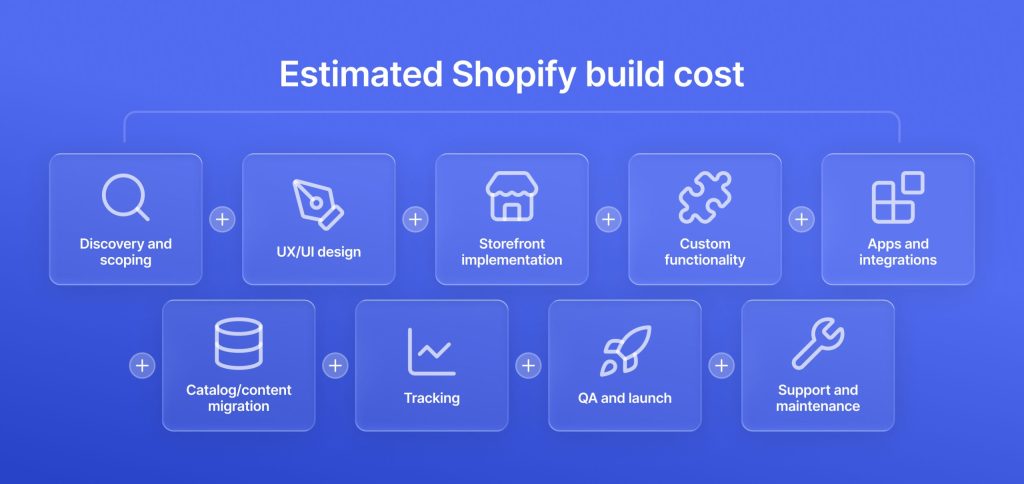
A useful Shopify estimate starts with the work that has to happen, not a store-size label or a page count. A practical model looks like this:
Each line can be light, substantial, or absent altogether. That is why the same platform can support a modest professional build and a complex implementation with a radically different budget.
Scenario 1: Theme-based DTC launch
Assume the brand identity and content already exist, a suitable free or premium theme has been selected, product and collection templates are standard, the catalog is limited and clean, payments and shipping follow standard Shopify setup, and the store needs only a small set of established apps. There is no difficult migration or ERP connection.
Under those conditions, a professional build typically lands around $3,000–$8,000.
That range covers a relatively contained implementation because the theme already carries much of the storefront structure. The estimate starts climbing when the project adds custom sections, UX/UI work, subscriptions or bundles, a large catalog import, multilingual or multi-market setup, or sophisticated analytics and tracking.
Scenario 2: Custom brand storefront
Now assume the project requires approved custom designs or includes design in scope, several reusable templates and sections, tailored product and collection experiences, app integrations, analytics, performance and accessibility work, plus structured QA and launch support.
With those assumptions, a custom Shopify storefront commonly falls around $10,000–$35,000+.
The higher upfront Shopify development cost pays for a storefront shaped around the brand’s merchandising and customer experience instead of the boundaries of an existing theme. This level becomes appropriate when a premium theme would require extensive workarounds, fragmented customizations, or compromises in how products and content need to be presented.
Scenario 3: Migration with business-system integrations
Assume an existing commerce platform is moving to Shopify and the project includes product, customer, order, or content migration; URL mapping and redirects; metadata work; an ERP, OMS, CRM, PIM, or marketplace connection; regional payment, shipping, or tax rules; tracking validation; launch reconciliation; and post-launch support.
A project with that scope commonly sits around $15,000–$60,000+.
Here, the visible storefront may account for only part of the effort. Data mapping, integration behavior, reconciliation, error handling, migration validation, and coordinated launch work consume substantial engineering and QA time. The source platform, data quality, number of connected systems, and regional rules can push the estimate upward quickly.
How to compare Shopify development quotes
Two Shopify proposals can land on similar totals and still cover very different amounts of work. The headline figure only becomes useful once the scope, exclusions, ownership, and recurring costs are visible.
Compare the storefront and design scope first
Start with the foundation of the build. Is the provider configuring a free or premium theme, heavily adapting an existing theme, or building a custom theme? That distinction changes both Shopify website design pricing and the amount of development behind the final result.
Then check what the quote expects from you. Are UX/UI design and responsive states included, or do you need to supply approved Figma files? How many unique templates, reusable sections, blocks, and custom interactions are covered?
A quote with one product template and a few standard sections cannot be compared directly with one that includes a broader component system and custom merchandising behavior. The same principle applies when hiring a Shopify developer or choosing a development partner: compare the work each provider owns, not just the rate attached to it.
Check the data, functionality, and integration scope
Product and content work can create a sizable gap between proposals. Confirm whether catalog cleanup, product setup, manual content entry, media preparation, and migration are included. If apps are part of the solution, check which licenses sit with the client and whether fees rise with usage.
Technical scope deserves the same level of detail. Ask which custom functions, APIs, and integrations are included, what test data or environments are required, and whether payments, shipping, tax, Shopify Markets, B2B, or checkout requirements have been priced in.
For migrations, confirm coverage for URL mapping, redirects, metadata, structured-data readiness, analytics, and tracking validation. QA should also be explicit: responsive testing, cross-browser checks, checkout QA, integration testing, accessibility review, performance validation, and regression testing all represent real delivery effort.
Clarify launch, handoff, and post-launch ownership
The final comparison should cover what happens as the store moves toward release and after it goes live.
Check whether staging, deployment, documentation, training, handoff, and post-launch support or warranty are included. Revision limits, change-request rules, third-party dependencies, and client-supplied materials should also be spelled out because each can affect cost or timeline.
A useful Shopify website development cost comparison comes down to one question: Are these providers pricing the same scope? One quote may cover only theme implementation while another includes design, migration, analytics, QA, launch support, and handoff. Those totals are not directly comparable.
How to reduce Shopify development cost without creating rework
The safest way to lower Shopify development cost is to remove uncertainty before development starts, not strip out work the store will need later.
Use the right foundation and control the scope
Start with the storefront foundation. If an existing theme already handles the required navigation, product presentation, merchandising, and content structure well, use it. Custom development should solve a real gap, not recreate features the theme already provides.
Lock the template and section list early, then reuse components wherever the experience allows it. A disciplined set of reusable sections cuts design and development effort and makes future page creation easier for the merchant team.
Scope control matters too. Separate launch-critical requirements from phase-two enhancements, and define markets, languages, B2B rules, and checkout needs before estimation. Consolidated feedback and clear acceptance criteria help the team avoid repeated revision cycles.
Prepare content, data, and integrations early
Content readiness has an equally large effect. Product data, imagery, copy, collections, metafields, and merchandising rules should be settled before implementation wherever possible. Late content changes often trigger layout revisions, data cleanup, and another round of QA.
Integrations deserve the same preparation. During discovery, define which system owns each piece of data, how frequently it syncs, what happens after a failed request, and how retries or reconciliation should work. Ambiguity here is expensive because it tends to surface during testing rather than planning.
For common requirements, an established Shopify app can save considerable build time. The app stack should stay lean, though. Overlapping tools create extra subscriptions, duplicate scripts, and more dependencies to maintain.
Protect the work that prevents expensive fixes later
Some work should stay in scope even when the budget is tight: migration planning, redirects, QA, tracking validation, performance work, accessibility requirements, and security or access controls. Cutting those items can make the initial quote smaller while pushing risk into launch week.
Finally, decide who owns the store after release. Planned support, release procedures, and clear responsibilities are cheaper to manage than treating every post-launch issue as an emergency.
How GetDevDone builds a Shopify estimate that holds up
At GetDevDone, every Shopify estimate starts with a clear view of what the team already knows and where uncertainty still sits.
A project with approved designs, a defined feature set, known integrations, and clear launch requirements gives us firm ground for a fixed scope. We can map templates, functionality, content responsibilities, QA, and release deliverables with confidence because the major variables are already visible.
Migration, legacy platforms, messy source data, and business-critical integrations call for deeper scrutiny. An ERP connection that looks simple in a requirements document can reveal mismatched fields, conflicting sync rules, missing test data, or edge cases once we inspect the systems. A replatform can uncover similar friction across customer records, product structures, redirects, analytics, apps, and launch reconciliation.
That discovery work gives the estimate substance. It exposes hidden dependencies before they consume budget, stretch the timeline, or complicate release.
The same discipline shapes GetDevDone’s Shopify development services. The scope may cover Shopify or Shopify Plus storefronts, custom themes and sections, migrations, business-system integrations, analytics, performance, accessibility, and post-launch support. Agencies can bring GetDevDone in as a white-label delivery partner, while eCommerce brands and multi-market teams can work with us directly.
The delivery model follows the demands of the project. A well-defined storefront can move through implementation, staging, QA, launch, and handoff with few surprises. A system-heavy build may need deeper data maps, integration checks, test scenarios, and reconciliation before release. Projects with broader platform or systems requirements can also sit within a wider eCommerce development scope.
Take a validated prototype live without a full redesign
A DTC skincare brand came to GetDevDone with an approved Bolt.new prototype that looked ready to shop but had no catalog, payments, inventory, shipping, tax, or order infrastructure behind it. Our team rebuilt the prototype as a custom Shopify storefront in four weeks, preserved the approved customer experience, and gave the client full control over products, content, fulfillment, and daily store operations through Shopify.
That same principle guides each estimate: define the job the store needs to do, surface the dependencies that can disrupt delivery, and choose an engagement model that fits the actual work.
If you ask how much it costs to build a Shopify website, the practical answer depends on the project type. A professional theme-led build can sit around $3,000–$8,000, while a custom theme can reach $10,000–$35,000+. Migration, Shopify Plus, complex integrations, or headless architecture can push the Shopify website development cost considerably higher.
Those figures cover project work, not the full cost of ownership. Shopify subscriptions, apps, payment fees, support, and future enhancements create recurring expenses after launch.
For U.S. merchants, Shopify currently lists Basic at $39/month, Grow at $105/month, and Advanced at $399/month, with lower effective monthly prices under annual billing. Apps, domain fees, payment processing, and support sit on top of the subscription.
The real Shopify store cost therefore depends on the software stack and sales volume as well as the plan. Shopify maintenance cost can also include custom-code updates, integration support, performance work, and planned releases.
A custom Shopify store cost commonly falls around $10,000–$35,000+ when the project includes bespoke UX/UI design, reusable sections, several templates, custom functionality, integrations, and structured QA.
The Shopify development cost rises when the team also needs to define the design system, solve unusual product logic, connect business systems, or meet demanding performance and accessibility requirements. A custom build makes sense when an existing theme cannot support the required brand, merchandising, or workflow needs cleanly.
Shopify website design pricing depends on how much design work exists before development starts. A project with approved Figma files needs less design scope than one that still requires UX work, responsive states, a design system, custom sections, and several unique templates.
Theme customization sits at the lighter end of that spectrum. A custom theme calls for deeper design and development because the storefront structure, components, interactions, and responsive behavior all need deliberate definition.
Usually, yes, when the theme already supports the required navigation, product presentation, sections, filters, and merchandising patterns. The merchant pays the theme license plus customization instead of funding a full custom theme.
Shopify theme development cost can climb when the team has to fight the theme’s underlying structure with extensive overrides. At that point, a custom theme may offer cleaner architecture and easier maintenance. The decision should depend on brand fit, functionality, and long-term upkeep, not the license price alone.
A Shopify app is usually cheaper when an established product already handles the requirement well, and its recurring fee remains reasonable at expected usage.
Custom functionality carries a higher upfront Shopify development cost plus future maintenance, but it can become the stronger choice when app limitations interfere with a core workflow, several subscriptions overlap, data access is too restrictive, or the required integrations do not fit the vendor’s model. The comparison should include subscription fees, vendor dependency, implementation effort, maintenance, and future change costs.
Shopify Plus itself currently starts at $2,500 per month on a one-year term or $2,300 per month on a three-year term in USD. That platform fee is separate from implementation.
Shopify Plus development cost can reach $25,000–$100,000+, depending on advanced B2B requirements, checkout work, Markets, Shopify Functions, Flow automation, integrations, migration, and release governance. Large enterprise programs can exceed that range when several systems and storefronts sit inside the same commerce architecture.
Shopify migration costs can fall around $15,000–$60,000+ when the project includes substantial catalog data, customers, or orders, redirects, metadata, integrations, and launch QA.
The source platform and data quality matter more than the visible page count. A migration may also require SEO safeguards, app replacement, analytics validation, ERP or PIM connections, and reconciliation after launch. Clean source data and simple system architecture keep the scope lower.
A freelancer can cost less for a narrow task with clear requirements and limited coordination. An agency or delivery partner carries a broader Shopify website development cost when the engagement also includes project management, design, QA, integrations, launch support, and specialist input.
The useful comparison is scope, not hourly rate alone. A straightforward theme adjustment may suit a freelancer perfectly. A migration or integration-heavy build can benefit from a team that already covers engineering, QA, delivery coordination, and post-launch support.
Common post-launch costs include apps, payment fees, support, theme or app maintenance, integration upkeep, performance work, and future change requests.
The amount depends heavily on the storefront architecture. A store with custom integrations or bespoke functionality can carry a higher Shopify maintenance cost than a clean theme-led build with a compact app stack. Before launch, confirm who owns updates, app renewals, API issues, performance fixes, and release support so those expenses do not appear as surprises later.
Yes, provided the initial build leaves room to evolve. A strong theme, reusable sections, clean product data, and a disciplined app stack can support substantial change without a full rebuild.
Problems appear when early shortcuts create technical debt, brittle theme modifications, or deep app dependencies. Future requirements may also justify a larger migration or headless architecture. A lower initial Shopify store cost works best when the first release covers the real launch needs and keeps the underlying structure clean.
Yes. Shopify hosting is included in the platform subscription, so a standard Shopify storefront does not need a separate web-hosting plan. The domain remains a separate cost when purchased independently.
The exception is a headless storefront. Shopify can still provide the commerce back-end, while the front-end may introduce separate infrastructure, deployment, monitoring, or hosting costs depending on the architecture. For a conventional Shopify theme, those additional infrastructure expenses do not apply.
Order development services online with a clear scope and timing. Buy AI engineering, eCommerce, front-end, website development, and digital design via structured service lanes.
Talk to a commerce advisor to define the right architecture, platforms, and growth model for your business.
Get guidance on configuration, scalability, and compliance — tailored to your market and goals.