
- Guide, Shopify development
- 5 min read
Shopify App Development Services for Custom Store Functionality
Shopify app development explained by Shopify veterans: app types, key features, use cases, and essential concepts for beginners.
How to build modular WordPress sites with ACF Blocks and JSON registration: clean code, fast, and scalable development

TL;DR
Modular WordPress development with ACF Blocks is valuable when agencies manage repeated website components across multiple projects and need a more reusable, maintainable, and scalable delivery model.
Agencies building WordPress websites at scale face a range of negative consequences resulting from repeated delivery. They have to rebuild similar sections across multiple projects and face growing maintenance costs from one-off templates. Different implementations of similar elements also increase QA instability and slow down launches.
That’s when a modular WordPress architecture starts paying off. Creating standard sections such as hero areas, testimonials, pricing tables, or FAQs as reusable ACF blocks instead of custom fragments considerably optimizes development effort. It also simplifies website quality assurance and ensures a more consistent publishing experience for editors.
This guide provides more details on modular ACF blocks and why WordPress-oriented agencies should use them when project volume and maintenance pressure start growing.
Traditional custom WordPress development relied heavily on monolithic themes: massive functions.php files spanning thousands of lines, theme-dependent functionality, and presentation logic tangled with business logic. This monolithic approach bundles all functionality into comprehensive systems where features are tightly coupled with design, creating maintenance nightmares and making code reuse nearly impossible.
The enterprise sector recognized this limitation first. Smaller agencies are now seeing the same benefits and value. Modular WordPress architecture delivers real reusability, maintainability, and scalability for complex environments. Companies managing multi-brand sites, regional microsites, or platforms requiring frequent feature rollouts discovered that modular development transforms logistical hassle into a controlled system.
The business case is straightforward
According to Atlassian’s 2024 State of Developer Experience report, 69% of developers report losing eight or more hours each week to workflow inefficiencies. In this context, modular ACF Blocks can help reduce friction by keeping teams in familiar PHP-based workflows instead of requiring React expertise and complex build toolchains.

WordPress introduced the Gutenberg block editor to modernize content management, but the native block development pathway demands substantial JavaScript knowledge. Most WordPress developers excel at PHP but face some challenges with modern JavaScript frameworks: Gutenberg requires React, ES6+, Webpack, Node.js, and JSX.
ACF Gutenberg Blocks solve this friction. ACF Blocks uses a powerful PHP-based framework to develop bespoke block types without the thorough knowledge of JavaScript or React required to create WordPress blocks. Development teams already proficient in WordPress theme creation can immediately build custom blocks using the same templating patterns they know.
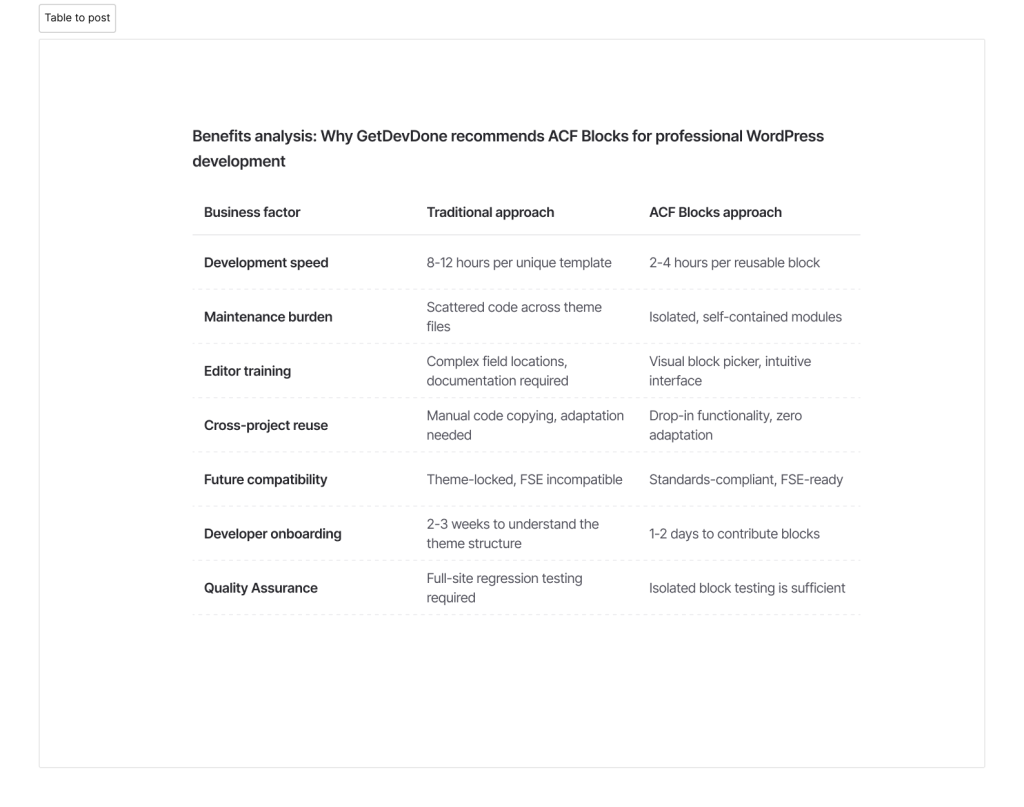
GetDevDone has implemented ACF Blocks across dozens of client projects because the approach delivers measurable advantages:
The technical distinction matters: ACF Blocks are rendered using a PHP template file or callback function, allowing full control over the HTML output, while native Gutenberg blocks execute client-side rendering with JavaScript. For enterprise applications requiring server-side rendering for SEO performance or teams without dedicated JavaScript engineers, this architectural choice becomes decisive.
For agencies, this means easier staffing because PHP teams can work productively without React overhead. It also helps onboard new developers and make the work of junior/mid WordPress engineers more effective, as they can contribute to block development on day one rather than requiring months of React consulting and training.
Across ACF’s 2023–2025 user surveys, more than half of respondents who create custom blocks report using ACF Blocks, frequently citing the PHP-first workflow and reduced JavaScript requirements as key reasons. The productivity implications become apparent when junior developers can contribute to block development on day one rather than requiring months of React consulting and training.
Professional WordPress development demands clear organization. GetDevDone structures custom themes using a modular block architecture where each component exists as a self-contained unit.
Recommended folder hierarchy
/wp-content/themes/your-theme/
├── blocks/
│   ├── hero/
│   │   ├── hero.php          (Template with rendering logic)
│   │   ├── hero.scss         (Component-scoped styles)
│   │   ├── hero.js           (Optional interactions)
│   │   ├── block.json        (Block metadata and configuration)
│   │   └── preview.png       (Visual preview for block picker)
│   ├── testimonials/
│   ├── pricing-table/
│   └── faq-accordion/
└── functions.php
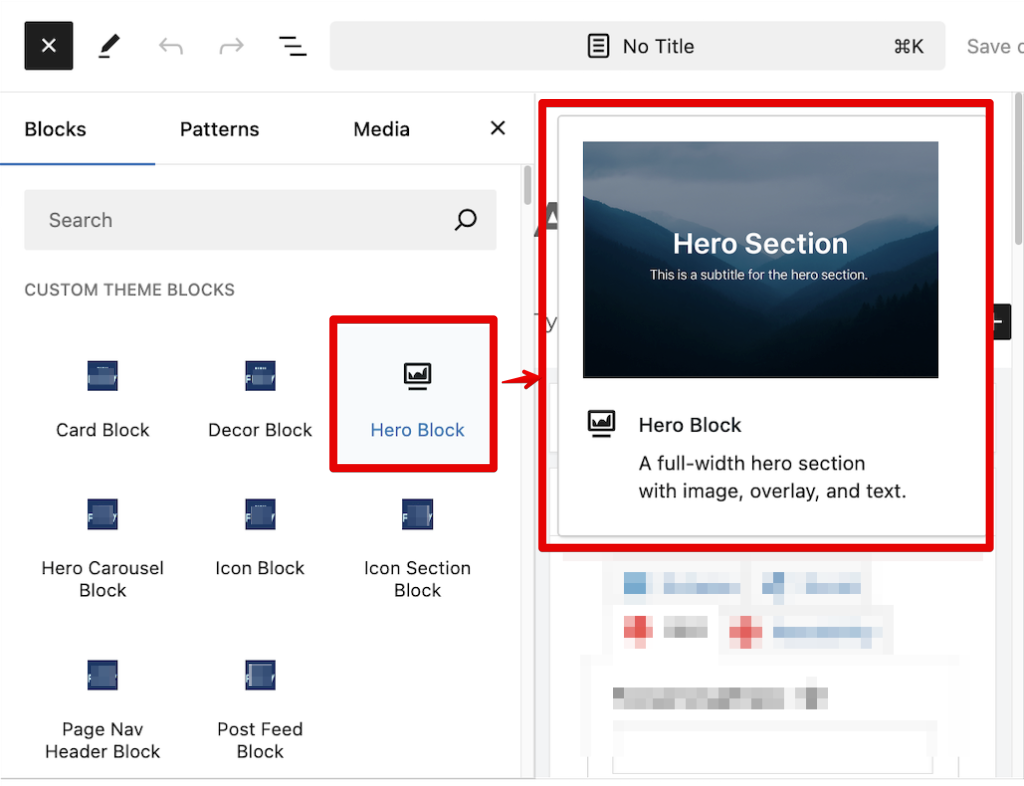
This structure provides immediate clarity, so the developers know exactly where block logic lives, designers can modify styles without touching PHP, and the preview image helps content editors identify blocks visually when building pages.
Each block contains
The preview image particularly matters for client usability, because editors browsing available blocks see exactly what each component looks like before insertion, reducing training requirements and preventing layout mistakes.
WordPress 5.8 introduced the block.json registration standard, replacing PHP-based registration patterns. ACF Blocks are registered with the standard WordPress function register_block_type(), which loads a block.json file containing configuration.
This JSON approach provides several advantages over legacy PHP registration:
For agencies, the block.json registration standard optimizes setup work and turns the block library into a system of components. Agencies can easily move blocks between client builds, ensure consistency across development teams, and simplify collaboration with technical experts.
Example block.json for a hero section
 {
  "name": "acf/hero",
  "title": "Hero Block",
  "description": "A full-width hero section with image, overlay, and text.",
  "category": "theme-blocks",
  "icon": "cover-image",
  "keywords": ["hero", "banner"],
  "acf": {
    "mode": "preview",
    "renderTemplate": "hero.php"
  },
  "supports": {
    "align": ["full", "wide"],
    "anchor": true
  },
  "example": {
    "attributes": {
      "mode": "preview",
      "data": {
        "preview_image": "preview.png"
      }
    }
  }
}
Register all blocks automatically in functions.php
// ACF Blocks registration
add_action('init', function() {
  register_block_type(get_template_directory() . '/template-parts/blocks/hero');
});

// To enable the block preview thumbnail
function theme_get_block_preview_image($block)
{
  $html = '';

  if (is_admin() and isset($_POST['action']) and isset($_POST['block'])) {
    $block_data_str = stripslashes($_POST['block']);
    $block_data_obj = json_decode($block_data_str);

    if (is_object($block_data_obj) and is_object($block_data_obj->data) and isset($block_data_obj->data->preview_image)) {
      if (file_exists($block['path'] . '/' . $block_data_obj->data->preview_image)) {
        $home_url = home_url();
        $path = str_replace(ABSPATH, '', $block['path']);
        $path = "/{$path}/";
        $preview_url = $home_url . $path . $block_data_obj->data->preview_image;
        $html = '<img width="470" src="' . esc_url($preview_url) . '">';
      }
    }
  }
  return $html;
}
This registration pattern scales elegantly; adding a new block requires only creating the folder structure and adding the block name to the array. No cluttered acf_register_block_type() calls scattered throughout the codebase.
GetDevDone follows a consistent pattern for creating field configurations. ACF custom blocks gain power through structured field groups that define exactly what data content editors can input. This makes delivered websites easier to manage while reducing maintenance effort for agencies. Content managers are less likely to make common mistakes and ask for fixes, as editors across different clients see familiar, thoroughly tested interfaces.
Step-by-step field group creation
Example hero block field structure
The Location rules automatically bind these fields to the specific block—when editors add a Hero Block to a page, they see exactly these fields in the sidebar. No confusion, no extra options cluttering the interface.
Field validation prevents common content errors
The PHP template controls block output. We, at GetDevDone, prioritize clean, semantic HTML with defensive coding practices that prevent display issues when editors leave fields empty.
PHP templates enable predictable rendering and clean separation of concerns, allowing agencies and engineering teams to build websites more efficiently. Thanks to isolated development, engineers can work on blocks independently and better redistribute work between junior and senior developers. Rendering block fields also accelerate debugging and help achieve repeatable output across multiple projects, which matters when you build and maintain many websites simultaneously.
Example hero.php template
<?php
/**
 * Hero Block Template
 */

// Preview the block design while browsing blocks
$img = theme_get_block_preview_image($block);
if ($img) {
  echo $img;
  return;
}

// Support custom "anchor" values.
$anchor = '';
if (!empty($block['anchor'])) {
  $anchor = 'id="' . esc_attr($block['anchor']) . '" ';
}
// Create class attribute allowing for custom "className" and "align" values.
$class_name = 'block-' . str_replace(['/', '_'], '-', $block['name']);
if (!empty($block['className'])) {
  $class_name .= ' ' . $block['className'];
}
// Full Site Editing for layouts
if (!empty($block['align'])) {
  $class_name .= ' align' . $block['align'];
}

// Generate unique ID for the block
$block_id = 'id="' . 'block-acf-' . uniqid() . '" ';
$anchor = $anchor ? $anchor : $block_id;

// Get the ACF fields
$hero_title     = get_field('hero_title');
$hero_subtitle  = get_field('hero_subtitle');
$hero_image     = get_field('hero_image');
$overlay_color  = get_field('hero_overlay_color') ?: '#000000';
?>

<!-- Render the block HTML -->
<section <?php echo $anchor ?> class="<?php echo $class_name ?> hero-block" style="background-image:url('<?php echo esc_url($hero_image['url']); ?>')">
  <div class="hero-overlay" style="background-color:<?php echo esc_attr($overlay_color); ?>"></div>
  <div class="hero-content">
    <h1><?php echo esc_html($hero_title); ?></h1>
    <p><?php echo esc_html($hero_subtitle); ?></p>
  </div>
</section>
Professional template practices demonstrated
This approach prevents the dreaded “blank sections” problem where editors forget to fill required fields—the block still renders with reasonable default content.
Component-scoped styling prevents the CSS cascade problems that plague monolithic themes. Each block’s styles live alongside its template, making maintenance predictable. It means agencies get reusable design components to apply across projects and cleaner design systems with defined styling rules for each component, which considerably reduces QA time.
Example hero.scss
// Hero block styles
.hero-block {
  position: relative;
  background-size: cover;
  background-position: center;
  color: #fff;
  padding: 6rem 2rem;
  text-align: center;


  .hero-overlay {
    position: absolute;
    inset: 0;
    opacity: 0.5;
  }


  .hero-content {
    position: relative;
    z-index: 2;
    max-width: 800px;
    margin: 0 auto;
  }
}
Enqueue the compiled CSS in functions.php
function enqueue_block_styles() {
    wp_enqueue_style(
        'hero-block-styles',
        get_template_directory_uri() . '/blocks/hero/hero.css',
        [],
        filemtime(get_template_directory() . '/blocks/hero/hero.css')
    );
}
add_action('wp_enqueue_scripts', 'enqueue_block_styles');
The filemtime() function generates cache-busting version numbers automatically—when styles update, browsers fetch the new version immediately without requiring manual cache clearing.
When an agency has multiple similar projects, building reusable blocks helps avoid paying repeatedly for the same section logic. The development team has reusable assets, which improves launch timelines and makes testing more predictable since these blocks have already been used.
GetDevDone maintains an internal block library that accelerates delivery timelines significantly.
Reusability workflow
Field group JSON export eliminates repetitive configuration
ACF automatically synchronizes field groups stored in the theme’s /acf-json folder. When deploying a block to a new project, the field configuration imports automatically—no manual field recreation required.
Project deployment becomes
# Copy block folder to new theme
cp -r /library/blocks/hero /new-project/wp-content/themes/client-theme/blocks/
# Register block in functions.php
# Field groups auto-import from /acf-json
# Block appears immediately in Gutenberg
This approach transforms block development from project-specific work into asset creation, and each block built becomes a permanent library resource that reduces future development time.
Gutenberg “Add Block” panel preview
Front-end preview

Static blocks serve many use cases, but complex platforms and websites often require context-aware behavior. PHP templates can include conditional logic that adapts block output based on page context.
These capabilities make a modular WordPress architecture suitable for websites with context-aware behavior and complex business logic. You can also customize them and create a unique website experience for end users.
Example: Homepage-specific styling
php<?php
// Detect homepage and adjust hero height
$is_homepage = is_front_page();
$hero_height = $is_homepage ? '100vh' : '60vh';
?>
<section
class="hero-block <?php echo $is_homepage ? 'hero-homepage' : ''; ?>"
style="min-height: <?php echo $hero_height; ?>;"
>
<!-- Template content -->
</section>
Example: Dynamic content from custom post types
php<?php
// If this hero is on a service page, pull related case studies
if (is_singular('service')) {
$related_cases = new WP_Query([
'post_type' => 'case-study',
'posts_per_page' => 3,
'meta_key' => 'related_service',
'meta_value' => get_the_ID()
]);


if ($related_cases->have_posts()) {
echo '<div class="hero-related-cases">';
while ($related_cases->have_posts()) {
$related_cases->the_post();
// Display case study cards
}
echo '</div>';
wp_reset_postdata();
}
}
?>
Example: A/B testing variations
php<?php
// Randomly select hero variant for conversion testing
$hero_variant = (rand(1, 2) === 1) ? 'variant-a' : 'variant-b';
$cta_text = ($hero_variant === 'variant-a')
? 'Start Free Trial'
: 'See How It Works';
?>

<section class="hero-block <?php echo $hero_variant; ?>">
<!-- Variant-specific content -->
<a href="<?php echo $cta_link; ?>"
data-variant="<?php echo $hero_variant; ?>">
<?php echo $cta_text; ?>
</a>
</section>
These patterns demonstrate how ACF Blocks transcend simple content containers. They become intelligent components that adapt to context, integrate with business logic, and support more refined website functionality.
According to the published ACF’s 2025 Annual Survey, 52.26% of ACF users who work with the block editor choose to build bespoke WordPress blocks with ACF Blocks rather than writing JavaScript. This majority adoption among professional developers reflects the approach’s practical advantages in production environments.
The ROI becomes particularly evident for agencies managing multiple client websites. According to industry analysis, PHP-experienced developers create production-ready ACF blocks within 4-6 hours of initial learning, and development time decreases significantly as teams build reusable block libraries. That efficiency compounds, as clients receive better value, project margins improve, and developers spend more time solving critical issues rather than rewriting testimonial sections.
Working with ACF Blocks requires a mature delivery practice and a skilled engineering team. Agencies must ensure that block systems can be validated systematically before launch, not just look for faster builds.
Before launching ACF Blocks to production environments, GetDevDone follows a systematic quality assurance process:
Technical validation
Content editor validation
Browser compatibility
Security verification
This systematic approach prevents the common deployment issues that erode client confidence: broken layouts, confusing interfaces, or security vulnerabilities.
The transition to modular WordPress development doesn’t require rebuilding an entire website. GetDevDone recommends starting with a single, high-value component.
Recommended first blocks for new adopters
Implementation timeline
Within one month, development teams establish the patterns, documentation, and confidence needed to accelerate future block creation. The investment pays returns immediately and continues delivering value across every subsequent project.
Agencies can get a real benefit from modular ACF Blocks once their projects reach a certain level of scale. This approach is also effective when website development includes many repetitive elements or when clients want more control over website editing without the risk of breaking layouts. The most typical uses are landing pages, service-site variations, multi-location websites, or client portfolios with similar structural patterns. In these cases, modular ACF Blocks allow teams to reuse previous project work, instead of building everything from scratch again.
The key advantage of this approach is that it lets teams ship projects faster, maintain codebases more easily, and scale sites more efficiently. It doesn’t sacrifice capability or performance; it offers a more practical way to structure custom WordPress development when professional results matter.
Some websites don’t need a fully modular block architecture. Small one-off projects for short-lived campaigns can be built with much lighter implementation. Before deciding whether to adopt modular ACF Blocks for website development, agencies should evaluate their types of projects and needs. At GetDevDone, we run business analysis to recommend the most feasible approach to website development that balances technical capabilities, flexibility, and costs. The basic rule is that a modular structure should save more time than it costs.
Agencies should consider modular ACF Blocks not as a full replacement to traditional development. Choosing the right approach requires understanding when modularity pays off and when it doesn’t. The main goal of ACF Blocks is to solve recurring delivery problems in projects that have many repeatable elements. A modular approach reduces repeated implementation, makes testing more predictable, and simplifies website editing.
While not every WordPress project needs a modular system, an agency may need one for repeated site launches. Modular ACF Blocks require more effort initially, but they become a practical model in the long term. Modularity enables teams to keep pace when project volumes and complexity increase.
Agencies should use modular ACF Blocks when they have multiple builds with similar sections or multiple ongoing projects. In these cases, a modular design architecture allows them to reuse components, optimize QA, and achieve higher consistency. The main sign that ACF Blocks are worth it for agencies is that streamlined project development and maintenance save more time than the initial setup of the modular system.
No, ACF Blocks are not only useful for large enterprise WordPress projects. While modular architectures are an efficient solution for complex, high-performance sites, they can also optimize the development and maintenance of smaller projects. Particularly, if smaller websites are managed by an agency that has several similar projects at the same time.
Reusable ACF Blocks cut delivery time by turning sections from previous projects into reusable delivery assets. With these assets, development teams don’t need to rebuild the same UI, code pages from scratch, or thoroughly test every detail. Reusability allows developers to reduce repeated operations and deliver projects faster.
Native Gutenberg block development is a better choice when website performance, user experience, and long-term maintainability are more important than development speed. While ACF Blocks take less time to develop, native solutions ensure enhanced editing and cleaner data. Native Gutenberg blocks are also preferable if a team has strong JavaScript / React capability and a more JS-first block ecosystem.
Yes, modular WordPress blocks simplify handoff since editors work with consistent visual blocks instead of one-off layouts. Solutions like custom Gutenberg blocks and ACF blocks allow clients and content teams to flexibly change layouts with pre-styled, reusable components that simplify modifications and maintenance.
Shopify app development explained by Shopify veterans: app types, key features, use cases, and essential concepts for beginners.

A guide your content team can use to optimize website pages for AI search results

Learn why web accessibility matters for SEO, usability, compliance, and creating better digital experiences for every user.