A B2B agency’s account team was losing hours per week to manual document hunts across an unstructured Google Drive. GetDevDone built an AI-powered knowledge assistant that lets account managers ask questions in plain English and get answers grounded in the agency’s own documents, with citations and clickable links to the exact source passages.
Our client is a B2B service agency helping businesses generate qualified leads, boost brand visibility, and lift conversion rates. They specialize in complex, long-cycle sales through data-driven content marketing, SEO, paid ads, and account-based strategies.
Business challenge
The agency’s working knowledge: proposals, SOWs, rate cards, playbooks, case studies, etc., lived in Google Drive with missing indexing, tagging, or reliable search. Keyword queries regularly failed. As the agency grew, information was no longer easily accessible, slowing execution, impacting deal progress, and creating inconsistencies across client work.
Proposal prep tax. Account managers spent 30+ minutes per proposal tracking down rates, deal language, and client terms — time taken directly from client-facing work.
Senior colleague dependency. When search failed, account managers escalated to senior staff, pulling the team away from accounts to answer repetitive internal questions.
Onboarding drag. New hires had no structured path to institutional knowledge, extending ramp-up and creating the same colleague dependency at every hire.
The client needed a centralized, searchable source of institutional knowledge — one that the team could query conversationally and get answers they could verify and reuse.
Solution delivered
GetDevDone built a custom permission-aware AI knowledge assistant in 7 weeks from the ground up. It indexes documents from a designated Google Drive folder, embeds them in a vector store, and returns source-cited answers that link directly to the exact passages used.
The document library stays fully under the agency’s control, with no full Drive crawl. The assistant integrates into existing account workflows and tooling, and document updates surface automatically on the next sync cycle, handled entirely outside engineering.
How the AI assistant works
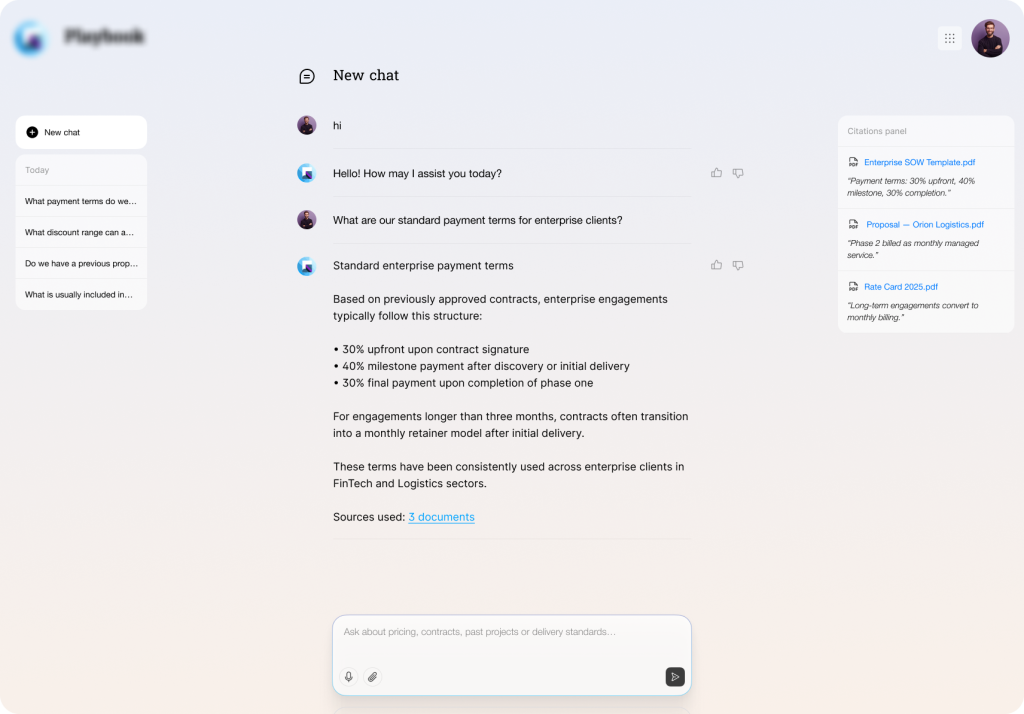
Account team members type questions in plain English and receive answers with citations — links to the exact source passages for verification and reuse in proposals or client communications.
Under the hood, the system runs on retrieval-augmented generation (RAG). The user’s query is embedded, matched against stored document chunks, and passed to the language model, which generates a response strictly from that context. If the answer isn’t in the documents, the system says so. RAG fits the dynamic client’s team whose source materials often update: new content activates on the next indexing cycle, skipping model retraining.
Key features
Document ingestion. Documents are pulled from a designated Google Drive folder on a scheduled sync, split into overlapping chunks, embedded, and stored in a vector index (Pinecone). Each chunk includes metadata: document title, type(proposal, SOW, rate card, playbook, case study), client name, and date, supporting precise retrieval.
Q&A with citations. Users type a question into a simple chat interface. The system embeds the user’s query, retrieves the most relevant chunks, and passes them to the language model to answer only from those passages. Every response includes clickable links to the source document and the specific passage used.
Feedback loop. Each answer carries thumbs-up/down buttons. Downvotes capture the query, retrieved chunks, and generated response, so the team members can identify retrieval gaps (wrong documents surfaced) or content issues (outdated or incorrect source material).
Document admin panel. A React-based management interface lets authorized users add or remove documents, apply tags, trigger manual re-indexing, manage permissions, and review the feedback log.
Technologies & tools
Node.js / TypeScript, AWS Lambda, API Gateway: serverless backend and API layer
Claude Sonnet: answer generation grounded in retrieved document context
Pinecone: vector database for document embeddings and semantic search
Amazon Titan: document chunking and embedding generation
By automating document search and knowledge retrieval, the AI-driven assistant engineered by GetDevDone improved account managers’ productivity. It shifted their efforts from time-consuming Google Drive hunts and reliance on senior colleagues to instant, coherent Q&A with source citations, freeing up time to win new business, cut proposal errors, and scale the commercial team without model retraining.
Faster time to outcomes
Proposal prep time dropped from 30+ minutes of manual folder-diving to a few targeted questions. Account managers get a cited answer with a source link in seconds, cutting pre-proposal research and freeing them to move straight into writing and execution.
Institutional knowledge as an operational asset
Rates, deal terms, precedent language, and playbooks, previously locked in a handful of people’s heads, are now searchable across the entire commercial team. This reduces single-point-of-failure risk and speeds deal decisions.
Shorter onboarding ramp
Newer team members work from the same reference points as senior ones. That direct access compresses ramp time and minimizes repeated hand-holding and document walkthroughs.
Deal consistency with verifiable sources
Every response is grounded in retrieved documents and linked directly to the passage used. Account managers are protected from assumptions and content drift, as they can verify language and data before it goes into a proposal or client communication.
Operational visibility without engineering effort
The knowledge base stays relevant automatically: document updates are reflected without model retraining, and no engineering involvement is needed. When something surfaces incorrectly, the feedback log tells teams exactly where to focus, so accuracy issues get caught before they reach a client.
See how a boutique agency without in-house developers launched a polished WordPress site to boost their brand and win clients, all with a smooth delivery and zero technical hassle.
Talk to a commerce advisor to define the right architecture, platforms, and growth model for your business.
Get guidance on configuration, scalability, and compliance — tailored to your market and goals.