

- Comparison
- 8 min read
Choosing the Best HIPAA Compliant Email Provider: 3 Solutions Worth Trying
Explore top HIPAA-compliant email providers and compare secure solutions for protecting patient data and meeting compliance requirements.
Compare Craft CMS vs. WordPress, their flexibility, ease of use, and customization features to decide which platform suits your website best
TL;DR
Craft CMS is better for highly customized, structured, and scalable websites. WordPress is a stronger fit for faster launches, lower entry costs, and broad plugin-driven functionality. Both platforms support SEO, eCommerce, multisite management, and custom development. The choice depends on project goals, technical requirements, budget, and maintenance preferences
WordPress and Craft CMS are two highly popular modern content management systems, alongside Webflow, Drupal, and other platforms for website building and content management. Since you’ve landed on this page, you must be looking for an answer to the question “Which of these two specific platforms suits my project better?”
Well, this depends on multiple factors. Both are great tools, bringing their own strengths and unique features to the table. You can build almost any type of website with WordPress development and Craft CMS. They just do it in different ways. Confused?
To clear the fog away and help you make an informed decision that aligns with your exact project’s goals, we’ve compiled this comprehensive guide.
Craft CMS is a developer-focused content management system designed for structured content, custom development, and long-term scalability. It’s built for teams that want full control over how content is modeled, rendered, and delivered, rather than relying on predefined themes or layouts.
Craft CMS is an open-source content management system based on the Yii2 framework. It was first released by the company called Pixel & Tonic back in 2013.
However strange it may sound (you’ll see why below), the founders were disappointed by the limitations of WordPress. So, they decided to create an alternative solution to give developers total freedom in their approach to modern website building.
In contrast to many CMSs available today, Craft CMS isn’t a rank-and-file website builder. It’s focused on developers. Thus, you need to know the staple web technologies (HTML, CSS, and PHP) to be able to develop websites the right way. That must be why the creators named their brainchild “Craft” (our guess).
On top of that, Craft CMS is built around a modern MVC structure and uses Twig for templating, which gives developers a lot of freedom in how content is modeled and rendered. It also includes native GraphQL support, so it works well for headless setups and API-driven projects.
Because of its performance, security focus, and built-in multisite support, Craft CMS often shows up in large, enterprise-level projects where teams need more controls.

Scalable development built for cleaner architecture and flexibility.
Order from $499
WordPress is a flexible, open-source content management system that makes it easy to build and manage websites of almost any type. It’s especially popular for its ease of use, massive ecosystem of themes and plugins, and low barrier to entry.
With PHP and MySQL under the hood, WordPress saw the light of day in 2003, that’s over two decades ago. Its founders Mike Little and Matt Mullenweg conceived it as a blogging platform. But as time went by, WordPress grew into something much bigger than just a handy content management tool for would-be web publishers.
It now serves as the driving engine for millions of websites of all types and sizes, from portfolios and eLearning platforms to online stores (in pair with WooCommerce) and enterprise solutions.
WordPress is free to download and install. As of late 2025, it remains the dominant open-source CMS, powering roughly 40–43% of all websites on the internet. That kind of adoption is one of the reasons WordPress continues to feel like a safe long-term choice for many teams. The truth is only a few platforms come close to that level of adoption. WordPress is famously known for its vast collection of themes and plugins (community and commercial) you can use to address every task out there, from marketing and search engine optimization to AI integration and website maintenance. By the way, WordPress is especially appealing for DIY site owners, small teams, and businesses that want to launch quickly without heavy development work.
But while they share many characteristics, what actually makes Craft CMS and WordPress different? Let’s break it down aspect by aspect.
| Aspect | WordPress | Craft CMS | Winner |
|---|---|---|---|
| Content Creation & Content Modeling | Flexible and simple for pages and posts. Advanced content structures usually require plugins and custom setups, which can become harder to manage as projects scale. | Content modeling is core functionality. Native fields, sections, and relationships enable clean, structured, and reusable content | Craft CMS |
| Ease of Use & Learning Curve | Very beginner-friendly. Fast installation, intuitive admin panel, and massive documentation make it easy to start publishing immediately. | Steeper learning curve. Requires technical knowledge, but provides a cleaner, more intuitive experience for managing structured content long term. | WordPress |
| Performance & Speed | Performance depends heavily on theme and plugin choices. Requires caching, image optimization, and regular performance tuning. | Lightweight MVC architecture with clean output, native image optimization, and consistent performance even on complex projects. | Craft CMS |
| Security & Maintenance | Core is secure, but large plugin ecosystem increases risk if plugins are outdated or poorly maintained. Frequent target due to popularity. | Smaller, well-vetted plugin ecosystem, modern framework security, and straightforward update process reduce attack surface. | Craft CMS |
| SEO Comparison: SEOmatic vs Yoast SEO | Yoast SEO provides strong editorial guidance and easy control over metadata and search appearance, ideal for small to mid-size sites. | SEOmatic enables rule-based, automated SEO across the entire site, ideal for large, structured, or enterprise projects. | WordPress for ease Craft CMS for advanced control |
| Plugins & Ecosystem (Quality vs Quantity) | 60,000+ plugins covering nearly every use case. Easy to install, but plugin overload can cause performance and security issues. | Smaller ecosystem focused on high-quality, tightly integrated plugins with direct access to developers. | WordPress for variety Craft CMS for quality |
| Themes vs Custom Development | Huge theme marketplace with free and premium options. Visual editors allow customization without coding. | No official theme marketplace. Typically relies on fully custom themes built with code for bespoke designs. | WordPress for themes Craft CMS for custom builds |
| eCommerce: Craft Commerce vs WooCommerce | WooCommerce enables fast, cost-effective store setup with extensive extensions and themes. Ideal for quick launches. | Craft Commerce offers fine-grained control over checkout, products, and integrations, built for scalability and custom workflows. | WordPress for speed Craft CMS for scalability |
| Accessibility & WCAG Compliance | Targets WCAG 2.0 AA, but accessibility depends on theme and plugin quality and requires ongoing audits. | Control panel audited against WCAG 2.2 and ATAG 2.0, with accessibility built into the core experience. | Craft CMS |
| Developer Experience, Extensibility, and Frameworks | Familiar environment with hooks and actions. Easy to extend, but large projects can feel fragmented over time. | Modern framework, clear structure, Twig templating, native GraphQL support, and cleaner long-term maintenance. | Craft CMS |
| Hosting & Infrastructure Requirements | Runs on almost any hosting provider, from shared hosting to managed WordPress environments. Very flexible. | Performs best on Craft-optimized hosting platforms; requires more planning but offers better alignment with the CMS. | WordPress |
| Pricing Comparison | Free core software, but costs accumulate via hosting, premium themes, plugins, and maintenance. | Clear per-project licensing (Solo, Team, Pro, Enterprise) with predictable, transparent costs. | WordPress for low entry cost Craft CMS for predictability |

Let’s begin by reviewing the core philosophy behind each platform, and their intended users.
WordPress is one of the best platforms when it comes to user centered design and functionality. Virtually anyone, with or without a technical background, can quickly and easily get to grips with it. Bloggers, small business owners, eCommerce website administrators—all will find WordPress’s interface straightforward to create and manage their content.
That’s exactly this core philosophy of universal accessibility that has made WordPress so immensely popular among everyone who wants to get their online presence up and running without digging into the system’s bowels.
Craft CMS, in turn, was designed to cater to the needs of developers and creative professionals first and foremost. The system’s philosophy centers around equipping developers with all the capabilities to craft custom websites tailored to unique needs without limitations typical of most WordPress themes, either free or commercial.
So, if you’re after a high degree of customization and flexibility and can expertly use principal web technologies, Craft CMS is definitely the way to go. It’s like putting a blank sheet of paper on the table in front of you and drawing away whatever you like, if you know how.

This is usually the first place teams feel a real difference between Craft CMS and WordPress, especially once content becomes more than just pages and blog posts.
WordPress approaches content in a more flexible but less structured way. It works very well for straightforward publishing, and you can extend it with plugins to handle more complex content types. However, once projects grow, that flexibility often relies on additional tools and custom setups, which can make content harder to manage over time.
Craft CMS puts content modeling front and center. Instead of forcing content into predefined structures, it lets you design exactly how entries relate to each other from the start. Custom fields, sections, and relationships are built into the core, which means you spend less time hunting for plugins and more time shaping content to match real business needs. As a result, content stays clean, consistent, and easier to reuse across different parts of a site.
In practice, Craft CMS tends to feel more natural for teams that deal with structured, repeatable content, while WordPress shines when simplicity and quick publishing matter most.

The next aspect on our agenda is how easy it is to get started with each CMS and, just as importantly, how comfortable it feels to use on a daily basis once the setup is done.
WordPress is widely known for being approachable, especially for non-technical users. From the first login, the interface feels familiar and forgiving, which makes it easy to start adding pages, posts, and media without much guidance.
The installation process for WordPress is also amazingly simple and lightning fast. Just a few steps through the convenient setup wizard and voilà: your WordPress website is here waiting for you to shape it into something that matches your vision, add content, and deploy it to a live server.
The platform also has an intuitive, easy-to-navigate interface, which even beginners without previous CMS experience can master in no time. You will find tons of useful resources on WordPress management and installation on the web.
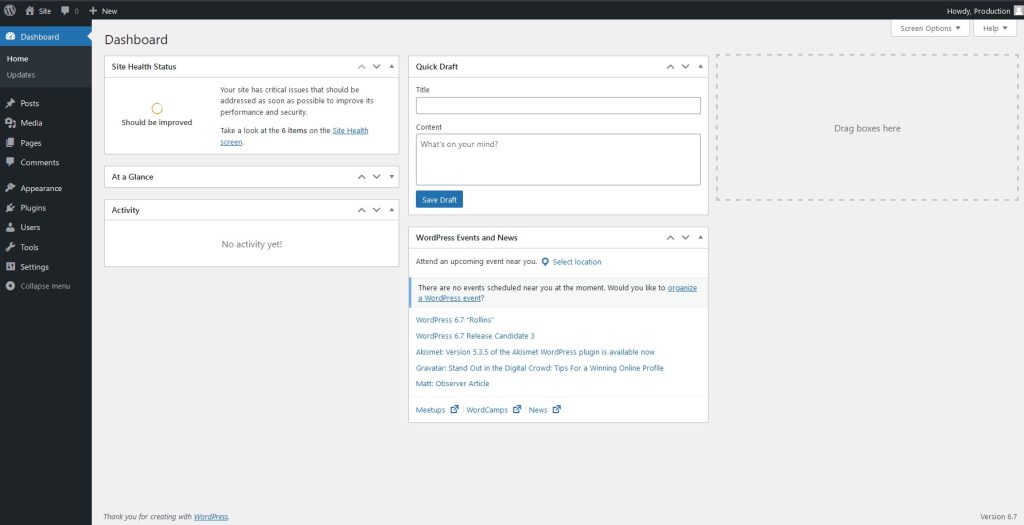
The bottom line is that WordPress is a fantastic option for everyone who wants to get started almost immediately. You do need to host a WordPress website on a server, though.
But, again, WordPress is so tremendously popular that finding a hosting provider takes just one Google search. Or, you can set up your site with a hosting provider right from the WordPress.org download page.
Unlike WordPress, installing and configuring Craft CMS is not a walk in the park without some technical expertise and a thorough understanding of the platform.
But when you’ve done it right, you get a very sweet reward for your efforts—the highest level of customization that few other tools, including WordPress, can beat. You can literally control every single facet of website creation: from the front end to the back end and everything in between.
In fact, the experience changes noticeably, especially for content authors working with structured data. The control panel is clean, focused, and built around clearly defined content models, which makes editing complex content feel more intuitive and less error-prone over time.
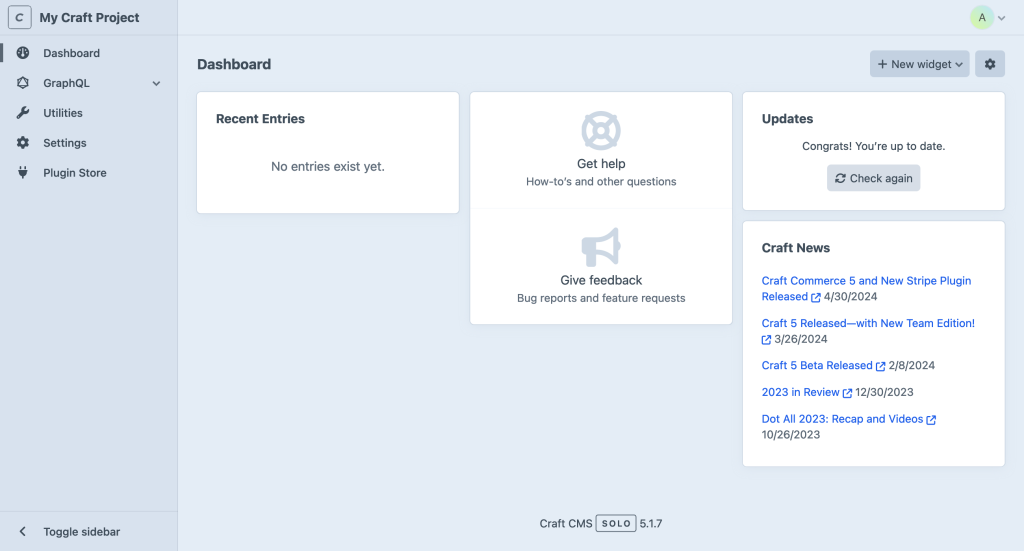
Craft CMS generally delivers more consistent performance out of the box, while WordPress performance depends heavily on themes, plugins, and ongoing optimization. Both platforms can be fast, but they achieve speed in very different ways.
WordPress gives you a lot of freedom through themes and plugins, but that freedom often leads to extra weight. As plugins accumulate and themes grow more complex, page size increases and PageSpeed scores can suffer. This kind of bloat doesn’t always show up right away, but it tends to build over time as new features get added.
That said, you can effectively prevent those issues if you manage your plugins properly and keep themes lean. For example, you may ensure that you don’t have several plugins addressing the same task, such as making backups of your content and data. Pick one best solution for each function and remove the rest.
To improve the performance and responsiveness of your WordPress website even further, you can use specialized plugins and various tools for image optimization, database management, and caching. When set up properly, WordPress sites can achieve good performance, but outcomes depend on the theme, plugins, and how actively the site is maintained.
Craft CMS takes a more performance-first approach by design. Its lightweight MVC architecture produces cleaner output, which usually leads to faster rendering and more predictable performance as projects grow.
Because Craft relies less on plugins and more on core functionality, there’s less overhead to manage. This makes it well suited for complex, high-traffic, or enterprise-grade projects where performance consistency matters.
We should especially commend Craft CMS’s image handling prowess. It perfectly optimizes any media you “feed” it without affecting the quality in any way.
And the cherry on top: real-time content preview. This amazing feature enables content editors and developers to see any updates they make instantly displayed on the screen.

Both Craft CMS and WordPress are secure platforms, but Craft CMS offers stronger security by default due to its smaller ecosystem and more controlled architecture. WordPress security depends more heavily on how well plugins and themes are maintained.
WordPress’s popularity makes it a frequent target for attacks. In practice, most security issues don’t come from WordPress core, which receives regular updates and patches, but from outdated or poorly maintained plugins and themes.
However, we should say that WordPress itself is very secure thanks to regular security updates and patches to keep cyber criminals at bay. It’s users themselves who are often the main culprit behind security vulnerabilities.
Why so? We’ve already discussed how obsolete plugins could invite trouble. When there are lots of them installed on a website and no action is taken to keep them updated, the site is slowly turning into an atomic bomb ready to explode at any moment.
So, again. If you choose WordPress, don’t get carried away by the sheer number of plugins up for grabs. Take a proactive approach by auditing the installed plugins and updating them on a regular basis, or removing those that no longer receive support from their developers.
Craft CMS, in turn, takes a more controlled approach to security. Its smaller, tightly managed plugin ecosystem reduces exposure to third-party vulnerabilities from the start. Because fewer plugins are involved, each one integrates more closely with the core system, which limits unexpected behavior and weak points.
Craft also benefits from its modern framework foundation, which brings built-in protections that many older systems don’t have by default. Updates are straightforward and can be applied quickly, often with a single click, which makes it easier to stay current without putting maintenance off. On top of that, the platform uses established security practices such as PDO to protect against common threats like SQL injection.
All that definitely puts Craft CMS above many of its competitors when security is your primary focus.
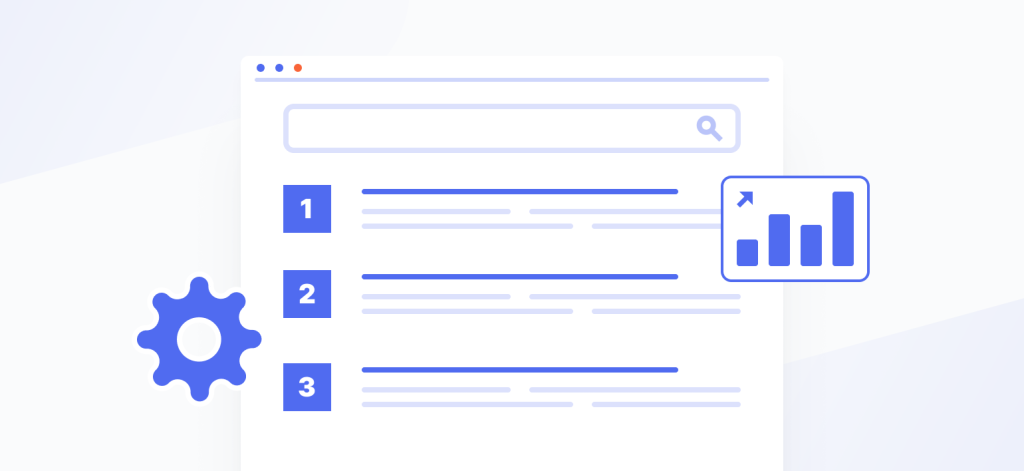
Both Craft CMS and WordPress offer excellent SEO capabilities, but they serve different needs. WordPress with Yoast SEO favors editorial guidance and ease of use, while Craft CMS with SEOmatic focuses on automation and structured control.
WordPress is widely recognized for its SEO-friendly foundation, largely thanks to its plugin ecosystem. Yoast SEO is one of the most popular tools, offering clear guidance while creating or editing content.
This easy-to-use plugin greatly facilitates the process of improving search rankings, guiding you in the right direction whenever you add or update content on your website.
Yoast SEO covers the basics most site owners rely on without much effort. You can control how pages appear in search results, and the plugin quietly handles the technical pieces in the background. If you use the paid version, it also gives you extra guidance while editing content, which can be helpful when you want a bit more direction without digging into details. For many WordPress sites, this feels practical and easy to keep up with.
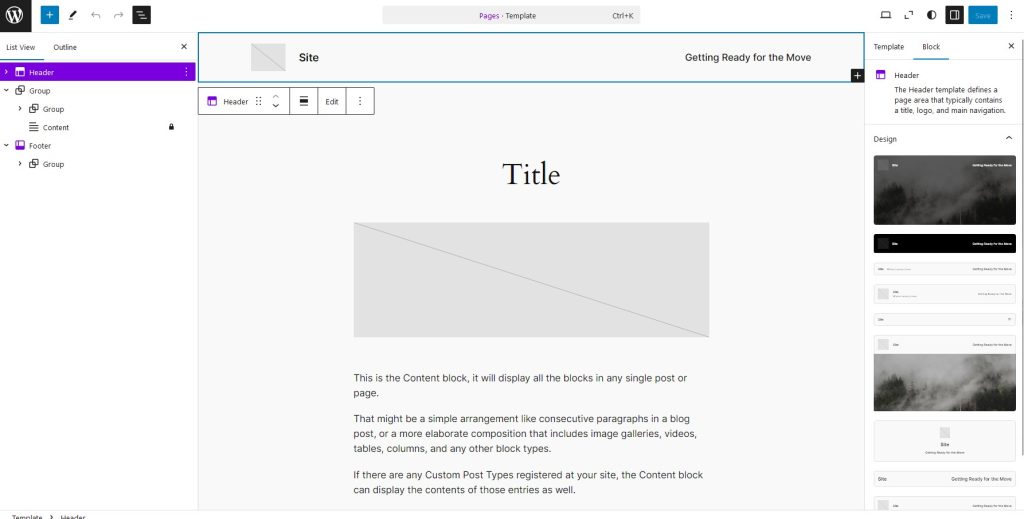
Production-ready development built for speed, UX, and scalability.
ORDER NOW
Craft CMS relies on SEOmatic, which integrates deeply into the platform. Instead of managing SEO one page at a time, SEOmatic allows teams to define rules that apply automatically across the site.
This works especially well on larger projects, where repeating the same adjustments manually would slow teams down and lead to inconsistencies.
So, if you’re an SEO expert who wants to fine-tune a Craft CMS website at a deeper level, SEOmatic acts as a command center with more customizable controls than most WordPress plugins. While Yoast covers similar ground, Craft paired with SEOmatic often appeals to teams that need stronger automation and structure rather than editorial guidance.
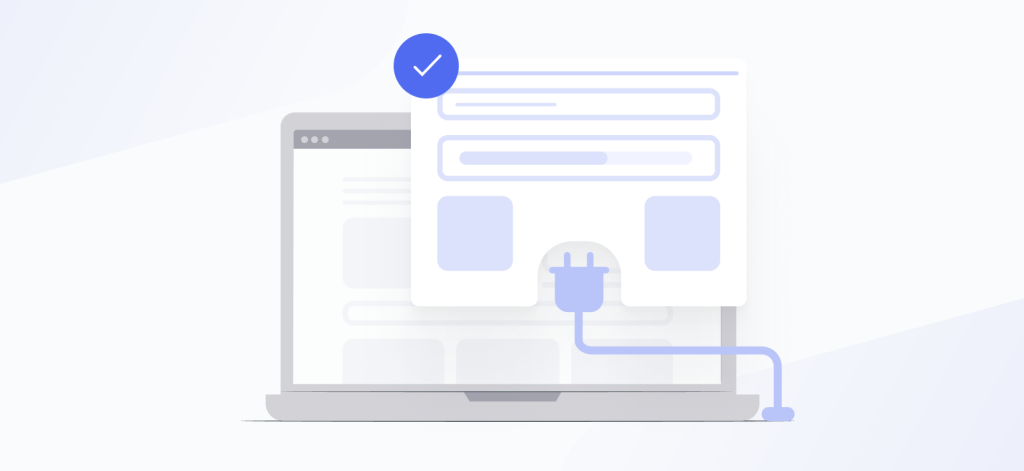
As for plugins and functionality, Craft CMS and WordPress continue playing their neck-to-neck game. They both provide excellent functionality capabilities, but as with most other aspects, do that in different ways.
Similar to themes, WordPress boasts a vast collection of plugins (well over 60,000 plugins at this point!) you can use to handle every task. And we mean every. For example, if you want to take advantage of the recent AI revolution to create content for your website in minutes instead of days, you can use one of the numerous ChatGPT plugins available in the WordPress repository.
Installing and activating a plugin is a straightforward button-clicking process, too. No coding is required. As a downside, you need to regularly check the plugins you’ve installed are not obsolete. Outdated plugins are a magnet for hackers who can exploit your site through them.
Also make sure that the plugins don’t come into conflict with one another, causing slowdowns and crashes. So, if you ultimately decide to take the WordPress road, our advice is to frequently audit your plugins and update them. At scale, this abundance can become a trade-off, where flexibility comes at the cost of higher maintenance effort and long-term complexity.
Quantity doesn’t always equal quality. Keeping this aphorism in mind, the developers of Craft CMS focused on creating a relatively small set of top-quality, well-vetted plugins (roughly 500 plugins) that perform specific functions and integrate with websites without a hitch. This contributes to higher performance and hassle-free maintenance.
There’s more. If you have questions on using a certain plugin or experience issues with it, you can connect with the plugin’s developer directly, bypassing the support team. This gives you confidence regarding the security and uninterrupted operation of your Craft CMS website.
In addition to the official plugins, you can find community-made plugins on various resources. In contrast to what the vendor offers, though, you should approach these solutions with caution.
Developers differ in their skills and experience. So, some “DIY” plugins can be poorly coded, leading to performance issues or even more serious problems.
Both platforms excel at design flexibility and customization, but they take different paths to achieve them. Each targets its own types of users and kinds of projects.
You might have heard about the vast collection of themes WordPress offers. If you visit their repository, you will find a huge number of themes to meet every need, both free to install and use and premium ones with more advanced features and top-notch support. This is, again, what attracts so many ordinary people without expertise in web development to WordPress. You can quickly set up a theme and modify it to embody your business personality.
Both platforms excel at design flexibility and customization, but they take different paths to achieve them. Each targets its own types of users and kinds of projects.
You might have heard about the vast collection of themes WordPress offers. If you visit their repository, you will find a huge number of themes to meet every need, both free to install and use and premium ones with more advanced features and top-notch support. This is, again, what attracts so many ordinary people without expertise in web development to WordPress. You can quickly set up a theme and modify it to embody your business personality.
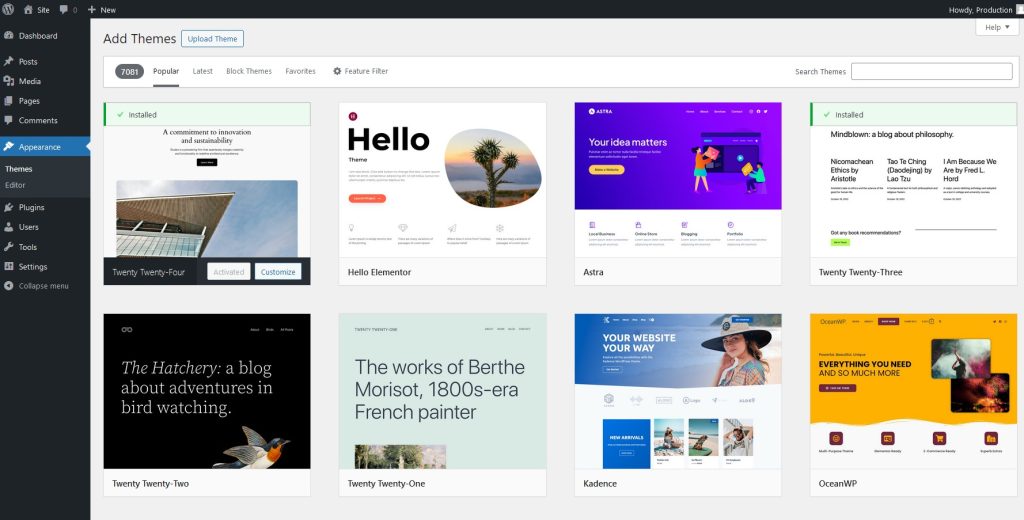
The best part? You don’t have to write a single line of code. Everything happens inside the handy visual editor.
If you thought Craft CMS should have a rich collection of themes similar to WordPress, we have to disappoint you. It doesn’t. At least, not at the official level.
Developers and designers themselves have crafted thousands of Craft CMS themes you can obtain for free or purchase on third-party websites. But since Craft CMS is a developer-focused system, you still have to modify those themes through coding.
If you’re truly interested in creating a bespoke website design, the best route you can take is to forgo pre-existing themes and code a theme from scratch, leveraging the powerful Craft CMS editing capabilities.
This way you will create a bespoke interface in full compliance with your specifications. The customization options are limitless provided you know how to use HTML and CSS to your best advantage.
Both WordPress and Craft CMS support powerful eCommerce solutions, but they target different use cases. WordPress favors speed and accessibility, while Craft CMS focuses on customization and long-term scalability.
To create eCommerce websites, WordPress offers a flexible and convenient WooCommerce plugin. Install and activate it, and you’ll transform your ordinary WordPress website into a fast and feature-rich online store that’s easy to launch and run.
This is a great way to set up an eCommerce site quickly and at a relatively low cost, especially if you have no previous web development experience. What’s more, you can choose from a variety of WooCommerce themes and plugins available in the WordPress repository to customize your store as you see fit.
By combining WordPress’s exceptional content management flexibility with WooCommerce’s powerful eCommerce capabilities, you get an effective tool to attract customers, enhance search engine visibility, and ultimately improve your sales numbers.
If you want to develop an online store based on Craft CMS, you need to use a plugin as well. Called Craft Commerce, it provides a fine-grained control over every aspect of your eCommerce solution.
With Craft Commerce, the sky’s the limit as far as customization goes. Integrate with multiple payment gateways, create a fully custom checkout process, manage complex product catalogs, or do anything else to suit your specific business needs. While setup requires more planning, the result is a highly scalable solution built for long-term growth.
This flexibility and tight control over the technical aspects of an online store make Craft CMS a preferred tool for brands looking to build a unique, easily scalable eCommerce platform they can customize in every way they want.
Craft CMS places stronger emphasis on accessibility at the platform level, while WordPress accessibility depends largely on themes and plugins. Both can meet accessibility standards, but the path differs.
WordPress targets WCAG 2.0 AA compliance, but actual accessibility varies based on theme and plugin choices. Some are well-designed with accessibility in mind, while others can introduce problems that require extra testing and cleanup. In other words, WordPress can be accessible, but it takes more vigilance and ongoing checks to keep it that way.
Craft CMS audits its control panel against WCAG 2.2 and ATAG 2.0 standards, ensuring accessibility is baked into the core experience. Thus, teams spend less time fixing issues after the fact and more time creating content with confidence.
Craft CMS offers a more structured and modern developer experience, while WordPress prioritizes familiarity and rapid development. The better choice depends on whether speed or long-term maintainability matters more.
WordPress feels familiar to many developers, which makes onboarding quick. Its hook and action system allows you to extend or adjust behavior without much friction, and when questions come up, answers are rarely hard to find. That familiarity helps teams move fast. Over time, though, as plugins and custom tweaks accumulate, projects can start to feel a bit stitched together, which can make long-term maintenance more challenging.
Craft CMS is built on a modern framework that encourages clean separation between logic, templates, and content. Because of that, extending the system often feels more intentional rather than reactive. GraphQL also fits naturally into this setup, especially when projects rely on APIs or headless delivery. Craft CMS is effectively headless-first out of the box, with GraphQL built into the core. WordPress can support headless architectures as well, but typically relies on REST or GraphQL plugins and additional configuration.
WordPress offers greater hosting flexibility and faster setup, while Craft CMS performs best on more specialized, optimized hosting environments. The right choice depends on how much control and performance tuning your project requires.
WordPress is very forgiving when it comes to infrastructure. It runs on almost any hosting provider, from basic shared hosting to high-end managed environments. That flexibility makes it easy to get started and just as easy to move later if needs change. For many teams, this wide compatibility is a big plus, since it keeps hosting decisions simple and budgets predictable.
Craft CMS is a bit more selective. While it can run on standard PHP hosting, it tends to perform best on platforms designed specifically with Craft in mind. Providers like Arcustech, Servd, and Craft Cloud offer environments tuned for Craft’s architecture, which helps with performance, updates, and overall stability. The setup usually requires more planning, but in return you get a hosting environment that feels tightly aligned with how Craft works.
In practice, WordPress suits teams that want maximum hosting freedom and minimal setup friction. Craft CMS fits better when performance, reliability, and long-term structure matter more than broad hosting availability.
When it comes to managing multiple sites, both platforms support multisite setups, but they approach them differently.

WordPress has a lower barrier to entry, while Craft CMS offers clearer and more predictable pricing at the project level. Over time, total cost depends less on licenses and more on maintenance, plugins, and development needs.
WordPress is an open-source CMS, meaning that it’s free to download and install. That being said, various costs may add up before and after you put your website online.
For example, you need to register a domain name for your website, which is like its digital address, and renew the registration, typically every year. Expect to pay from around $10 to $20 annually for this.
Then there’s the cost of hosting your website, or the space where your website is located on a server. Various hosting providers like GoDaddy or HostGator have different prices for these services, sometimes widely different. You might start at just around $4 and go up all the way to $100 and more, depending on your requirements.
Besides, you may want to purchase a premium theme or plugins for your WordPress site. That increases the total sum of the bill. Commercial themes typically cost between $25 and $250, while plugins range from $15 to $200. There are other factors influencing the price of a WordPress website, too. Explore our post “How Much Does It Cost to Build a WordPress Website in 2026? Data-Driven Truth” for a comprehensive review of what the cost of building a WordPress website involves.

Craft CMS uses a per-project licensing model with clearly defined four plans: Solo (free), Team, Pro, and Enterprise.
These differ in their features and support. For example, with the Solo plan, you get only one administrator account. At the same time, the Team plan gives you access to five accounts, while the other two premium plans don’t limit you in this respect.
Or, the Solo and Team plans come without the Custom Roles and Permissions, Branded control panel, and Branded communication features. Therefore, to make the most of Craft CMS, you certainly need to purchase a premium license, at least Team.
There’s an upside to this upfront spending, though—predictability and flexibility. You know that you can only pay for what really matters to your business instead of bulk-buying features you don’t need at all.
At the end of the day, if pricing is your key selection point, Craft CMS comes with a well-structured pricing model, where quality and fine control are in the spotlight. On the other hand, WordPress is flexible as far as financial investment is concerned, but has hidden costs that you may incur down the road.
| Use Case | WordPress | Craft CMS |
| Small budget, but need an online presence ASAP | + | |
| Large-sized project with complex content types, requires deep customization | + | |
| Beginning user, with no technical background | + | |
| Proficient in key web technologies | + |
Now, we want to share two projects we’ve done for our clients using each platform. Perhaps, one of these websites looks similar to what you have in mind, which can be a decisive argument in the Craft CMS vs WordPress dilemma you’re currently trying to solve.
This is a project we did for Hallingcast, a forward-thinking Norwegian digital agency, using Craft CMS.
We expertly converted the Figma designs the client provided into fully functional web pages: a comprehensive blog overview, detailed article pages, a captivating homepage, and others.
We also added a number of custom features, including seamless video integration in the hero section and some exciting dynamic effects, like changing characters in the main page heading.
Efficiently using Craft CMS and its plugins for email marketing, social media integration, and SEO, our experts created a powerful and flexible platform geared towards meeting Hallingcast’s specific needs.
To dive deeper into the project details and learn how we achieved these results, read the full case study “Leveraging Craft CMS to Create Hallingcast’s Corporate Website.”
And here’s the BizDeva project, which saw us designing and developing a custom WordPress website for a brand led by the dynamic sales expert, Maryna Nikitchuk. Our mission was to enhance her personal brand and online presence with a site that truly reflects her expertise and vision.
We began with a creative design process, crafting a mood board that resonated with Maryna’s brand identity. This laid the foundation for a stunning website design, incorporating hand-written elements and a unique color palette.
Our front-end team then transformed these designs into a pixel-perfect web experience, while our WordPress experts built a custom theme enriched with engaging features.
One standout element is the Testimonials Carousel we developed using the Swiper slider for a sleek, interactive display. We also implemented animations on scroll using the Motion One library, and a custom cursor that adapts its appearance based on user interactions.
To broaden Maryna’s reach, we integrated multilingual support with the Polylang plugin, ensuring content is accessible in English and Ukrainian, with potential for expansion.
The outcome was a visually captivating and functionally robust website that aligned perfectly with Maryna’s vision. The project significantly bolstered BizDeva’s online presence, enabling the client to showcase her sales expertise and connect with a wider audience.
Explore the full case study “Designing and Developing a Custom WordPress Website to Promote the BizDeva Brand” to see how we brought this project to life and contributed to BizDeva’s digital success using the power of WordPress and its vast ecosystem of plugins.
So, which platform should you choose for your mission-critical project? Below, you can find some practical recommendations from our experts.
Choose Craft CMS if you need a highly customized, scalable website with complex content structures and long-term maintainability in mind. It’s best suited for projects where content modeling, performance, and architectural control are more important than quick setup or ready-made themes.
If you want a truly unique, deeply customized solution with a large scope and complex content types, we recommend choosing Craft CMS. Thanks to its flexible, well-structured architecture, developers can craft tailored solutions without the limitations that many generic tools impose. This makes Craft CMS especially suitable for projects where content modeling, scalability, and long-term maintainability matter.
Your web development expertise and experience matter, too. If you’re already proficient with principal web development technologies, Craft CMS is the number one option to consider. It gives developers full control over both the front end and back end, allowing them to build professional-level solutions intentionally rather than relying on pre-built components.
Take the Craft CMS route if you want a highly customizable, professional-level website where performance, scalability, and uniqueness are top priorities. It’s perfect for projects with a dedicated developer or agency and for businesses that see their website as a long-term strategic asset rather than a quick launch.
Choose WordPress if you need to launch quickly, work with a limited budget, and want a flexible platform that doesn’t require deep technical expertise. It’s especially well suited for small business websites, blogs, portfolios, and projects where speed and ease of use matter more than deep customization.
If you’re somewhat restricted in your financial resources but need to launch a website as quickly as possible, WordPress is probably a better choice. It’s open-source, free to download and install, and offers a great number of themes and plugins to get you started at a relatively low cost. This platform is ideal for projects with a small scope and a modest budget.
Your technical background also plays an important role. If you’re just starting out, WordPress is the right platform to choose. With its intuitive interface and a world of resources available online, this platform is a go-to solution for beginning users who want to manage and update their websites without writing code.
In general, choose WordPress if you need a quick, pre-built solution for a small business website, blog, or portfolio with minimal development effort. It allows teams and individuals to move fast, validate ideas, and expand functionality gradually as their needs evolve.
Let’s hear what our leading CMS developer Serhii Chyzhykov has to say about this tough choice:
As an expert developer with vast experience in building both WordPress and Craft CMS websites, I can say that each of these platforms brings unique benefits to different types of clients.
WordPress is a perfect fit for small and medium-sized businesses, bloggers, online stores, and companies that need to have their website up and running quickly, using a wide range of ready-made solutions.
Its flexibility and extensive collection of plugins allow users to address a great number of issues even without significant technical resources at their disposal.
Craft CMS, on the other hand, is a staunch favorite among clients who come from creative industries, as well as agencies and companies in need of solutions fully tailored to their specific needs.
This platform provides complete control over the website layout, design, and performance, which makes it ideal for projects where uniqueness and a high degree of customization are key.
In my experience, the choice of a CMS always hinges upon business specifics and project goals. We serve clients from various industries, helping them achieve the best results by selecting a platform that meets their unique needs.
Serhii Chyzhykov
CMS Developer, GetDevDone
30+ senior-level web development professionals.
HIRE BEST TALENT
We’ll begin by reviewing the technical capabilities each system requires to run on a server.
To run WordPress, you need to satisfy the following server-side requirements:
| Web Server | ⇒ Apache (preferred) or Nginx. ⇒ Other options: LiteSpeed, Microsoft IIS. |
| PHP | ⇒ PHP 7.4 or greater (WordPress recommends PHP 8.0 or later for better performance and security). ⇒ Some specific extensions are required: ♦ mbstring ♦ json ♦ curl ♦ zip ♦ xml ♦ dom ♦ GD or Imagick (for image processing). |
| Database | MySQL 5.7 or greater, or MariaDB 10.3 or greater. |
| Storage | Minimum 1 GB of available disk space, but more is recommended for large sites. |
| HTTPS (SSL) | SSL certificate is important for secure data exchange (especially for login and payment processes). |
| PHP Memory Limit | Minimum of 256 MB PHP memory limit for better performance (higher might be necessary for larger sites). |
Craft CMS is generally more demanding than WordPress in terms of hosting environment and configuration.
| Web Server | ⇒ Apache or Nginx (Apache is preferred). ⇒ (Apache) or proper URL rewriting (Nginx). |
| PHP | ⇒ PHP 8.0 or greater (Craft CMS recommends PHP 8.1 or later). ⇒ Required extensions: ♦ mbstring ♦ json ♦ curl ♦ gd or imagick ♦ opcache ♦ fileinfo ♦ zip ♦ dom. |
| Database | MySQL 5.7+ or MariaDB 10.3+ (Craft CMS also supports PostgreSQL for some installations). |
| Storage | Minimum 1 GB of disk space (larger sites or media-heavy sites may need more). |
| Other Requirements | ⇒ HTTPS for secure connections. ⇒ Composer for managing dependencies in more sophisticated setups (Craft CMS projects often rely on Composer). |
To sum up, here are the key distinctions between WordPress and Craft CMS as far as server-side specifications are concerned:
| WordPress | Craft CMS | |
| PHP Version | Can run on PHP 7.4. | Requires a new version of PHP (8.0+). |
| Database | Generally requires MySQL or MariaDB. | Supports both MySQL/MariaDB and PostgreSQL. |
| Server Configuration | Works with Apache or Nginx. | Works with Apache or Nginx, but is generally more demanding when it comes to specific configurations, particularly for advanced functionality. |
| Composer | Uses Composer for dependency management. This can add another layer of complexity in comparison with WordPress. | Has a more user-friendly plugin and theme system. |
Next, let’s have a look at what the installation process for each platform involves.
There are basically two ways to install WordPress: using a web host and manually.
The majority of web hosting providers offer one-click WordPress installation using their control panel (such as cPanel or Plesk). Here is the most straightforward method, step by step:
1. Log in to your hosting control panel (cPanel, Plesk, etc.).
2. Find the Softaculous or WordPress Installer section.
3. Click Install for WordPress.
4. Choose the domain and directory (if you want to place WordPress in a subfolder).
5. Specify admin credentials (username, password, email).
6. Click Install and wait for the process to finish. Once the installation is complete, visit your site and log in to the WordPress admin panel at http://yourdomain.com/wp-admin.
Certain hosts don’t provide one-click installers. In this case, you need to install WordPress manually. Here is what you need to do:
1. Download the latest version of WordPress from https://wordpress.org/.
2. Upload the extracted WordPress files to your server’s root directory (normally public_html), using an FTP client (like FileZilla) or your hosting file manager.
3. Create a database:
4. Run the installation:
Since CMS is a more developer-focused CMS, it requires Composer for installation. Here are the steps you need to take:
1. Install Composer if you haven’t done so yet. You can download Composer from getcomposer.org.
2. Create a project in a directory of your choice by running this command:
composer create-project craftcms/cms my-project3. Set up the database:
4. Run the Craft CMS install command from your terminal (when located in your project directory):
craft setupNow, go through the Craft CMS setup routine, specifying your site name, admin username, password, and so on.
5. Sign in the Craft CMS control panel by entering http://yourdomain.com/admin in your browser’s address bar.
Scalable development built for cleaner architecture and flexibility.
Order from $499
In summary, here are the main distinctions between the platforms as far as the installation process goes:
| WordPress | You can use your host’s one-click installer or install the system manually, which involves FTP and database setup. |
| Craft CMS | Requires Composer for installation, so it’s generally a better fit for developers or users who know their way around command-line tools. |
Both systems have intuitive, easy-to-navigate dashboards, but they differ in the degree to which you can customize them, with Craft CMS clearly winning on this point. Here are the details:
| Design & Layout | ⇒ A handy menu on the left with quick access to the most frequently used sections: Plugins, Posts, Pages, Media, Settings, and more. ⇒ A highly customizable main dashboard with widgets, such as site stats, quick draft, recent posts, and so on. ⇒ Has an “old-school” design and layout in contrast to many present-day platforms. |
| Usability | ⇒ Beginner-friendly, but can become cluttered, with plugins adding more menu items over time. ⇒ Adding content is convenient and straightforward with the default block editor Gutenberg. ⇒ You can find comprehensive documentation online and easily get troubleshooting assistance from a large and empathetic community. |
| Customization | ⇒ Highly extensible with plugins, but can become messy and hard to go around if you install too many plugins. ⇒ Too many themes and plugins may bring inconsistencies to the admin experience. |
| Design & Layout | ⇒ A sidebar with tabs such as Utilities, Settings, GraphQL, and Plugins for quick access to the respective sections. ⇒ Customizable, with widgets like recent entries and analytics to instantly view and manage crucial data. |
| Usability | ⇒ A steeper learning curve in contrast to WordPress. However, the dashboard gives you more control over structuring content. ⇒ Intended for designers and developers who practice a structured, practical approach to content management. ⇒ Offers customizable fields for various needs, making content entry very flexible. |
| Customization | ⇒ An amazingly customizable and flexible dashboard. You can freely design its layout and content workflows to meet every project’s needs. ⇒ No bloat caused by unnecessary plugins, since developers often create features to cater to the specifics of a particular project. |
| Best For | ⇒ Developers and experienced users managing custom websites with superior performance. ⇒ Projects that use highly specific content structures or integrations. |
WordPress has a much vaster ecosystem of themes in comparison with Craft CMS.
Since the latter focuses on customizability and uniqueness, developers mostly create Craft themes from scratch. Here are a few more details:
| Overview | ⇒ Thousands of pre-existing themes available on the WordPress Theme Directory, marketplaces like ThemeForest, or from independent developers. ⇒ Easy to install and customize for beginners. ⇒ Types: ♦ General-purpose themes (e.g., Astra, OceanWP) ♦ Page builder themes (e.g., Elementor Pro, Divi) ♦ Niche-specific themes (e.g., themes for photographers, restaurants, blogs). |
| Customization | ⇒ The majority of themes offer customization through the WordPress Customizer (editing the layout, colors, and typography in real time). ⇒ Advanced themes integrate with page builders and can be edited by drag-and-dropping. ⇒ Limited flexibility in themes that don’t support fine-grained design changes, which can only be implemented by custom coding. |
| Examples | ⇒ Free Themes: Astra (Free Version), Twenty Twenty-Three. ⇒ Premium Themes: Avada, Divi, Flatsome. |
| Pros | ⇒ A vast collection of pre-built themes suitable for various needs and industries. ⇒ Perfect for users with little to no coding experience. ⇒ A large number of themes integrate well with plugins for additional features. |
| Cons | ⇒ Without customization, you get a “cookie-cutter” website that looks like thousands of others on the Internet. ⇒ Many themes come with extra scripts or features that can seriously impact the website performance. ⇒ To customize a theme for a different look & feel and additional functionality, users need to be well-versed in coding. |
Production-ready development built for speed, UX, and scalability.
ORDER NOW

| Overview | ⇒ Number: Craft CMS doesn’t have a comprehensive collection of pre-existing themes that WordPress offers. Typically, developers themselves design and build themes from scratch based on their own reusable boilerplates. ⇒ Approach: Craft focuses on custom-made designs rather than on pre-built themes. |
| Customization | ⇒ Complete control over the HTML, CSS, and JavaScript code with the Twig template engine. ⇒ With Craft, developers get a “blank sheet” to create bespoke, highly optimized designs. ⇒ No dependence on pre-existing layouts or inflexible theme frameworks. |
| Examples | ⇒ You can find starter kits or frameworks like Craft Starter Templates, which developers offer for download. |
| Pros | ⇒ Designers and developers are completely free in bringing their creative ideas to life. ⇒ Perfectly optimized for performance, with no extraneous scripts. ⇒ Best fit for projects where unique brand identity and business-specific features are key. |
| Cons | ⇒ No WordPress-like “install and forget” themes, which makes Craft challenging for users without web development skills. ⇒ Building a website takes more time and effort in contrast to using off-the-rack themes. |
Finally, here’s a quick overview of the differences between the platforms regarding themes:
| WordPress Themes | Craft CMS Themes | |
| Number | Thousands of pre-made themes | Few (custom development is standard) |
| Ease of Use | Beginner-friendly | Developer-oriented |
| Customization | Limited unless custom coded | Fully customizable |
| Performance | Can be bloated with unnecessary code | Lightweight and well-optimized |
| Cost | Free and premium options | Requires developer expertise, no free themes by default |
Similar to themes, Craft CMS’s approach is to offer a relatively few, but top-quality plugins that seamlessly integrate with the core.
WordPress, on the other hand, features an enormous variety of plugins that cover all tasks you can imagine.
Here’s more detailed information:
| Number | ⇒ More than 60,000 free plugins in the WordPress Plugin Repository. ⇒ You can also purchase thousands of premium plugins from marketplaces like CodeCanyon or independent developers. |
| Ease of Use | ⇒ You can install almost any plugin with just a few clicks. ⇒ No prior coding experience is required. |
| Types | A broad range: analytics, security, SEO, eCommerce, forms, caching, and many other types. |
| Examples | ♦ SEO: Rank Math, Yoast SEO ♦ Forms: Contact Form 7, WPForms ♦ Custom fields: ACF ♦ Multi language: Polylang, WPML ♦ eCommerce: WooCommerce ♦ Page Builders: Elementor, WPBakery ♦ Caching/Performance: W3 Total Cache, WP Super Cache ♦ Security: Wordfence, iThemes Security |
| Pros | ⇒ An immense collection of plugins to address almost every task you can name. ⇒ Easily integrate with the core. ⇒ Effortless setup. ⇒ The most widely used plugins have comprehensive community and developer support. |
| Cons | ⇒ Not all plugins are of high quality. Many are not supported or insecure. ⇒ Too many installed plugins affect performance and cause conflicts between various plugins. ⇒ Some plugins may restrict features to paid access. |
| Number | Unlike WordPress, Craft offers far fewer plugins (hundreds). You can get them from the Craft Plugin Store or by directly installing them from GitHub and Packagist. |
| Ease of Use | ⇒ Technical expertise is necessary. ⇒ Many plugins require assistance of professional developers for configuration and customization. |
| Types | “One-size-fits-all” is not Craft’s approach. Its plugins focus on extending custom features. |
| Examples | ♦ eCommerce: Craft Commerce (built-in, not a plugin) ♦ SEO: SEOmatic ♦ Forms: Freeform, Sprout Forms ♦ Multi language: built-in ♦ Development Tools: Redactor, Element API ♦ Custom fields: built-in ♦ Caching/Performance: Blitz |
| Pros | ⇒ Craft plugins are top-quality, developer-focused solutions with clean code and seamless integration into the core. ⇒ Compared to WordPress, Craft CMS plugins are often lighter. ⇒ With Craft CMS, you can build custom plugins tailored to unique needs of website owners. |
| Cons | ⇒ Fewer plugins than WordPress offers, restricting functional capabilities. ⇒ Many plugins are commercial or come with licensing fees. |
So when should you choose WordPress or Craft CMS if using plugins is your main concern?
| WordPress | Choose WordPress with its plugins if you need a large collection of pre-made solutions you can easily install and set up yourself without professional assistance. |
| Craft CMS | Go with Craft CMS if you need extremely flexible, highly configurable plugins with superb performance for a custom website run by developers. |
That wraps up our Craft CMS vs. WordPress comparison. We hope this information will help you finally make this super important move: select the perfect system for building your business website.
In the end, we’d like to repeat the words of our leading CMS Developer Serhii Chyzhykov:
In my experience, the choice of a CMS always hinges upon business specifics and project goals.
No. They’re built for different jobs. Craft CMS fits custom, structured projects. WordPress works better when speed, budget, and simplicity matter.
Choose Craft CMS when the site is complex and needs to stay clean and manageable long term. It’s the better option when custom structure matters more than fast setup.
Yes. WordPress is still a solid choice. It’s easy to use, widely supported, and works well for many small and mid-sized projects.
WordPress. It’s easier to learn and easier to manage without technical experience.
Craft CMS. It handles structured content and custom logic more cleanly as projects grow.
By default, yes. Craft has fewer moving parts. With WordPress, security depends more on how well plugins and updates are managed.
Yes. WordPress is quicker to launch. Craft is better when the store needs custom behavior or long-term flexibility.
All in all, Craft CMS is the better fit when you need a custom, scalable site with strong performance and security, while WordPress shines when speed, budget, and plugin flexibility are the top priorities.
We hope this comparison has helped clarify the differences and made it easier to choose the platform that best supports your business goals.
Whichever system you ultimately choose, Craft CMS or custom WordPress, GetDevDone has expert developers on board to create a stunningly beautiful website aligned with your unique needs.
Whether you’re looking to build a completely custom solution, want to customize a pre-existing theme, or require a bespoke plugin to perform a function specific to your business, we’ve got you covered.
Our overarching goal is to help your brand or agency grow and succeed! Contact us today and let’s turn your vision into reality.
Explore top HIPAA-compliant email providers and compare secure solutions for protecting patient data and meeting compliance requirements.

Compare the best 6 AI code cleanup companies for agencies if you need to fix, refactor, partially rebuild, or replace AI-generated websites before launch or handoff.

Learn when agencies should buy, outsource, or build AI chatbot integration for client websites. How much it costs to choose the right approach.