When WooCommerce Is a Practical Fit for a WordPress-Based Online Store
First-hand experience when WooCommerce is a practical fit for a WordPress online store, including costs, flexibility, security, and long-term maintenance.
TL;DR
WooCommerce is a practical fit for WordPress-based online stores that need flexibility and control, but its long-term success depends on disciplined implementation and maintenance.
WooCommerce has no upfront licensing cost, but store setup, integrations, design, performance, and extensions can add implementation costs
WooCommerce supports physical products, digital goods, subscriptions, bookings, services, and other selling models
Plugin and theme selection directly affects performance, maintenance complexity, and long-term store stability
WooCommerce can provide strong security, but it requires quality hosting, regular updates, backups, and ongoing maintenance
WooCommerce includes core eCommerce capabilities such as product management, payments, shipping, analytics, and marketplace integrations
WooCommerce platform remains a popular way to turn a WordPress site into an eCommerce store. It provides the core functionality, including convenient product management, order handling, shipping, and payment processing.
Despite all the benefits of WooCommerce, it isn’t as effortless and free as many website owners assume. To launch a successful store with decent performance and a positive user experience, you will need to decide on theme quality, extensions, performance, security, and ongoing maintenance.
This article explores when WooCommerce is a practical choice for an online store and what to consider before implementation, drawing on GetDevDone’s experience in eCommerce and WordPress development.
What is WooCommerce?
WooCommerce is a WordPress plugin that transforms an existing website into an online store with the core functionality required for modern eCommerce development. By extending WooCommerce with plugins and customizations, merchants can manage payments, products, customer support, marketing, and other critical online sales operations.
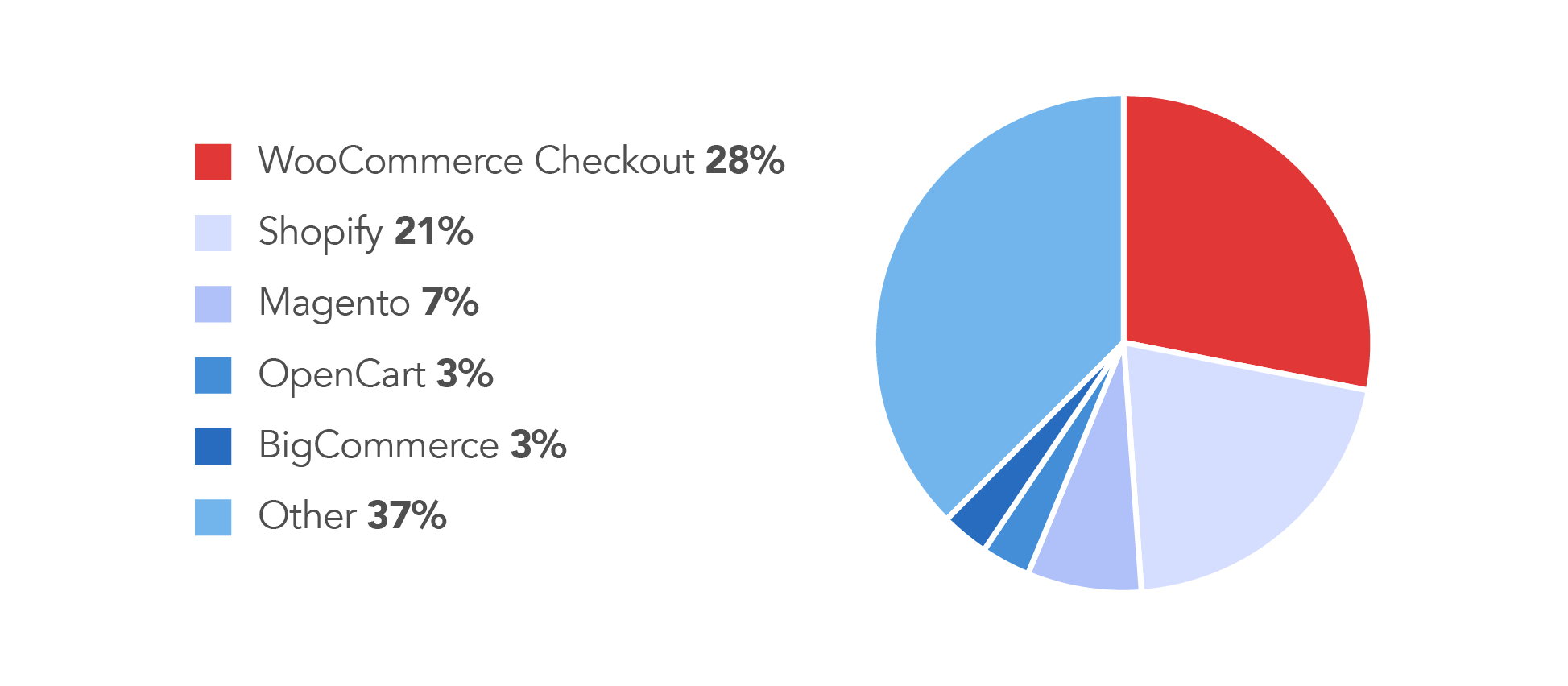
Thanks to its flexibility, scalability, and extensive ecosystem, WooCommerce remains one of the most popular platforms for eCommerce website development worldwide. According to the data on builtwith.com:
So, what do online merchants get when they decide to integrate WooCommerce into their WordPress sites? Below, we’ve listed the main benefits of WooCommerce for anyone who has made up their mind to sell goods or services on the Internet through this plugin.
What Can Online Business Owners Expect From The World’s Leading E-Commerce Platform?
So, what do online merchants get when they decide to integrate WooCommerce into their WordPress sites? Below, we’ve listed the main benefits of WooCommerce for anyone who has made up their mind to sell goods or services on the Internet through this plugin.
#1: Low platform entry cost, but not zero implementation cost
The WooCommerce plugin is free to install, which makes it suitable for businesses with limited budgets. However, to launch a competitive online store, you will still need to invest in design, setup, payment integration, shipping logic, and performance optimization. You may also need paid extensions for add-ons, like custom product options or automated marketing, which can increase costs. Overall, WooCommerce can be cost-effective, particularly when compared to subscription-based options, but it often comes with hidden costs if you want some customization.
#2: Flexibility
WooCommerce is incredibly flexible, just like WP itself. This concerns both appearance and functionality. On the other hand, the variety of settings also creates implementation choices and complicates maintenance, which should be taken into account when using WooCommerce. Below, we share more details on how you can modify an online store.
Themes
You can easily give a new face to your WooCommerce store by going to the WP official directory and selecting a theme to your liking. Note that some WordPress themes are suitable for WooCommerce, but not all are equally good, so you need to check compatibility. Theme quality also affects website performance, product-page structure, and mobile responsiveness.
Then, tweak the theme you’ve chosen to suit your taste and meet your specific needs. You can also make use of the extension called WooCommerce Product Blocks. It enables you to select and display products in different categories on all pages of your site (not only product pages). The categories include hand-picked products, new products, on-sale products, and others.
GetDevDone can also craft a custom WooCommerce theme for your store to reflect your brand identity. You will be able to modify it wherever you want by changing the code. This is something no ready-made solution can offer you: you can only change images, text, and the layout of a theme like that.
Plugins
A basic WooCommerce store has enough features to run an online store successfully. However, to include some custom or advanced functions, it requires external solutions or plugins. In this respect, WP site owners are lucky again because they can install WP plugins along with those crafted specifically for WooCommerce.WooCommerce extensions cater to almost any business function, such as store management, marketing, or shipping.
A variety of extensions make WooCommerce flexible, but you should not overuse them. While a plugin is an easy way to solve a problem, when you install too many plugins, it may cause the following problems:
You have to update them regularly in order to avoid security issues.
A large number of extensions can cause a slowdown in your store’s operation because they consume a lot of memory.
Since you have no access to the underlying code of a plugin, you depend on its creator. If they decide to discontinue supporting the plugin, but it’s essential for your business, you are in trouble.
Suitable for physical goods, digital products, and service-based offers
No matter what niche you are in, you can use WooCommerce to sell your offerings. WooCommerce enables different selling models, including physical products, digital goods, bookings, subscriptions, and services. You just need to configure the store accordingly.
#3: Strong security potential, but only with proper setup and maintenance
WooCommerce allows digital agencies and website owners to create a secure online store, but the level of security depends on configurations. You need to maintain a strict update schedule, ensure quality hosting, regularly review and update plugins, and control access. It’s also necessary to create backups and organize reliable long-term maintenance.
With a self-hosted WooCommerce website, companies get more control over data storage and stack than hosted platforms can typically offer. However, that control requires more technical knowledge and responsibility.
Besides, WooCommerce cooperates with a number of the world’s top specialists in Internet security. This includes experts in WP security, specifically, such as Sucuri. WooCommerce store owners can benefit greatly from the Cloudproxy Firewall that this leading online security company offers. It also contributes to increased website speed.
Another of WooCommerce’s advantages from the security perspective is that all your store’s data is yours only, and no one can use it except you. You can do whatever you want with your data, for example, migrate it to another CMS. This is a weak point with hosted platforms, where you risk losing your data when something goes wrong on the provider’s side.
#4: WooCommerce Offers All the Features That an Online Store Is Supposed to Have
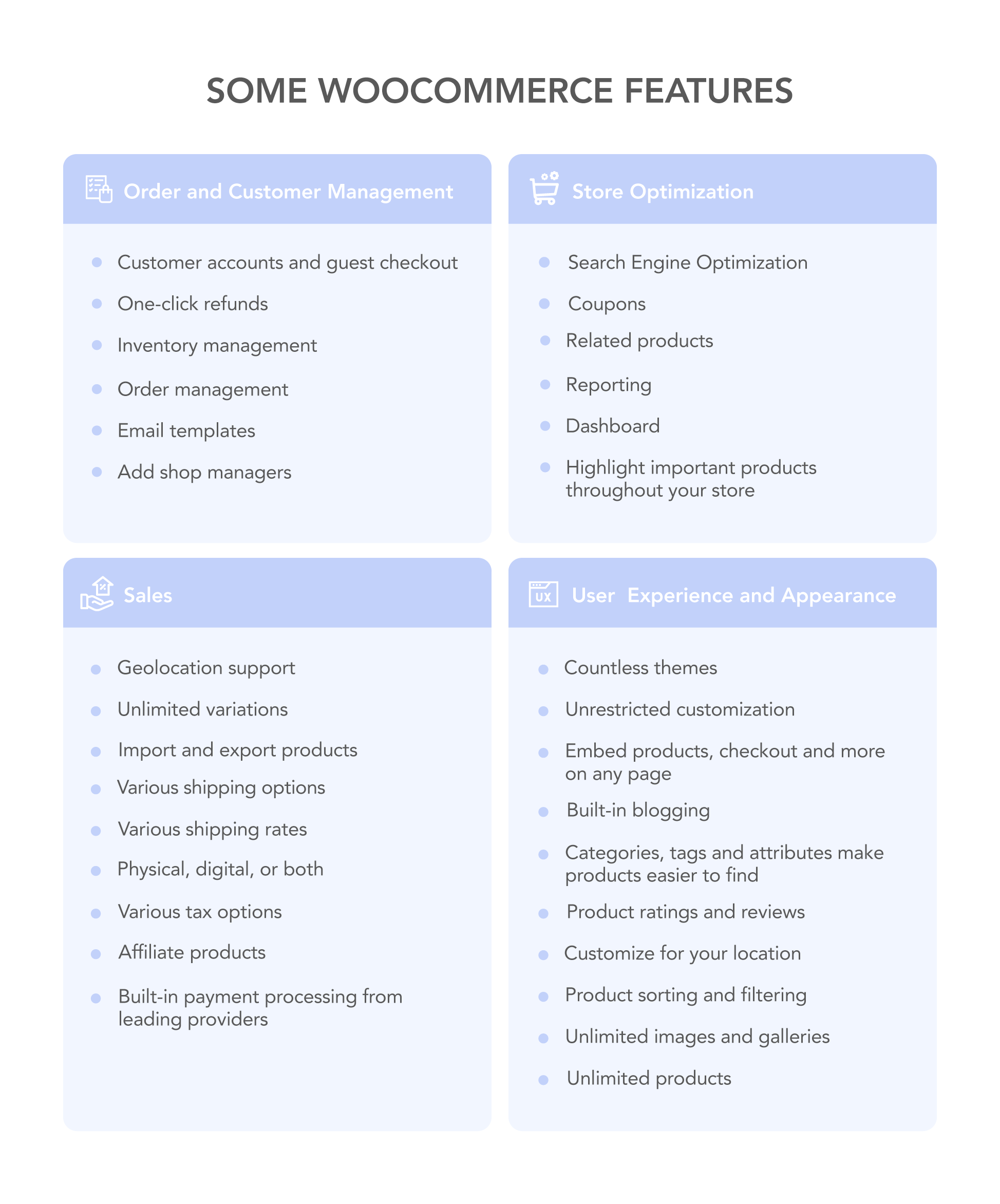
Using WooCommerce, businesses can build an online store with payments, product management features, shipping rules, and standard store operations. It also offers some advanced functionalities such as marketplace sync, analytics, and customer workflows.
Analytics
WooCommerce provides all the useful analytics functionality by default in one centralized location. If you find these tools insufficient, you can always add external tools to your store through plugins or the REST API.
Shipping
WooCommerce has a broad range of options when it comes to shipping. For example, you can use the geolocation feature to identify a customer’s address. This will help you determine a more precise shipping rate and tax deduction.
You can also let your customers decide how they want their goods to be delivered to them: collect them locally or use a shipping service. In addition, you can either come up with a flat shipping rate or determine individual rates for shipping certain categories of products.
Payment
Taking payment from your WooCommerce store customers is easy since it integrates with more than a hundred payment systems, such as PayPal. Other payment options like Cash on Delivery or Direct Bank Transfer are also available.
Selling on Numerous Marketplaces
WooCommerce supports extensions and third-party integrations that allow e-commerce businesses to connect marketplace and multichannel selling workflows.
On a Final Note
WooCommerce is a practical choice for many businesses that want to add online store functionality to a WordPress website without changing the technology stack. It offers high flexibility, control, and relative ease of use. Besides, merchants can combine the features of WordPress and WooCommerce.
WooCommerce is a secure and flexible platform that requires no upfront investments to set up, even for people without a technical background. It also has all the characteristics of a good online store, such as analytics, integration with payment gateways, shipping options, and others.
At the same time, the WooCommerce online store has the best performance when implemented with discipline and careful consideration of every add-on. Its long-term efficiency depends on theme quality, selected extensions, security practices, and ongoing maintenance.
WooCommerce stores built for real traffic, smoother scaling, and better conversion
Yes. WooCommerce is generally a good choice for small and midsize stores, particularly when they want to build e-commerce features on top of a WordPress website. It provides a lot of flexibility in terms of themes, plugins, and selling models, enables advanced SEO, and ensures complete ownership. However, the actual website performance still depends on the quality of setup and maintenance.
While the WordPress plugin is free itself, launching a multi-functional and customized store incurs additional expenses. Businesses should also be ready to pay for premium themes, extensions, payment setup, shipping configuration, performance optimization, and other fine-tuning. Therefore, the total cost of launch and maintenance depends on online store customization and complexity.
WooCommerce is a better choice than hosted platforms like Shopify or Squarespace when a business wants additional control over website design, content, and data. It also makes more sense if you need integrations inside the WordPress ecosystem. WooCommerce is a typical choice for content-heavy businesses or those who already have a WordPress website and plan to reuse it.
Yes. WooCommerce has the capabilities to build a secure online store, but the level of security depends on proper website configuration and maintenance. Since it’s a self-hosted, open-source platform, security requires quality hosting, reliable plugins, access control, and regular updates.
Yes. WooCommerce is suitable for building online stores that sell different types of products and services. It can support physical goods, digital downloads, and other types of offerings. The online store setup depends on the selected business model and may require additional extensions or specialized workflows to enable bookings, subscriptions, or consultations.
Plugins become a problem when they have overlapping or identical functionality, affect performance, or have poor compatibility. When a store has too many plugins, it may also complicate updates and maintenance. That’s why online store owners should keep the extension stack manageable and regularly review it.
Do you have a Figma design and wonder how to convert it into a functional WordPress website? Read this post to discover three possible methods to approach this task, including their pros, cons, and challenges.