Every AI-generated application that handles accounts, data, payments, files, or integrations requires a dedicated security review before launch.
AI-generated applications can expose user data, credentials, payments, and production systems even when demos and standard QA pass.
Review authentication, authorization, secrets management, database access, APIs, uploads, and dependencies before deployment.
Validate security controls at both the application and infrastructure level, including monitoring, logging, rate limiting, and rollback readiness.
Treat production readiness as a security process, not a feature-completion milestone.
Complete handoff documentation is part of the security posture, not a post-launch administrative task.
Your vibe-coded portal may work in the demo and still be unsafe to launch
The security audit on an AI-generated website or client portal is the agency’s responsibility, whether it was scoped into the project or not. AI-generated code ships functional features but often skips the decisions that make them safe: where secrets are stored, how sessions are managed, and if one user can access another user’s data. Every vibe-coded build that touches accounts, payments, files, or production APIs needs a deliberate pass across secrets, authentication, access control, database rules, APIs, dependencies, and deployment before it goes anywhere near a client’s live environment.
What are the biggest vibe coding security risks agencies find too late?
As part of our AI engineering services for agencies and brands, GetDevDone audits AI-generated builds that have passed stakeholder reviews and are approaching launch. The same production-critical security gaps surface across projects time and again:
Hardcoded secrets and API keys in the codebase or frontend bundles
Broken or unreviewed authentication
Weak authorization that exposes other users’ data
Direct database access without row-level policies or least-privilege roles
Missing input validation on forms, APIs, and uploads
Vulnerable or hallucinated dependencies
Insecure file uploads
Client-side-only access restrictions
No rate limiting on login or API endpoints
Missing logs and audit trails
If your build has more than two, it is not ready to launch.
Know what you are launching before you audit it
The audit scope depends entirely on what the build does.
A brochure website or CMS site with no user accounts and no backend integrations needs a lighter pass than a client portal, internal tool, ecommerce build, public SaaS-like portal, or AI-enabled portal that calls production APIs.
Moving an AI prototype to production is where risk rises sharply, especially when the build handles user accounts, private records, file uploads, payments, admin dashboards, LLM calls, or production integrations with live client data. Any build that touches those does not go live until it has been reviewed.
If regulated data is involved, including anything under GDPR, HIPAA, or PCI scope, compliance exposure starts the moment the build is accessible.
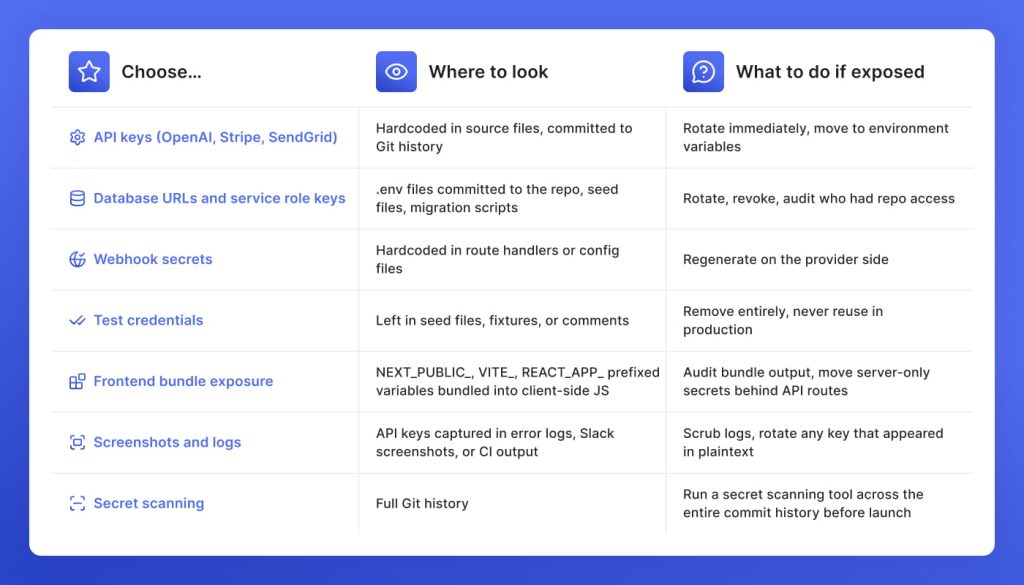
Checklist 1: Find hardcoded secrets before the client opens DevTools
AI-generated code embeds secrets the way it externalizes everything else: whatever works in the moment. If no one audited where API keys, database URLs, and service credentials ended up, assume they are in the wrong place. If anything below is already exposed, rotate it immediately before touching anything else.
Checklist 2: The authentication check for AI-generated builds that agencies are about to deliver
Across every AI-generated build GetDevDone has audited, authentication is where the most consequential gaps hide. AI tools wire up auth flows that work in happy-path testing and fall apart everywhere else. Check every item below before the build goes anywhere near a live environment:
Use an established auth provider (NextAuth, Clerk, Supabase Auth, Firebase Auth) rather than any custom auth logic the AI generated
Verify that session tokens are stored in httpOnly, Secure, SameSite cookies, not in localStorage
Confirm that session expiry is configured and tokens are invalidated on logout
Check that password reset flows use time-limited, single-use tokens and cannot be enumerated
Verify that every API route and server action enforces authentication, not just the frontend pages
Confirm rate limiting is active on login, password reset, and any auth-related endpoint
Disable any auth providers that were scaffolded but are not actively used
Check whether MFA or SSO is required, given the sensitivity of what the portal handles
Review brute-force protection on login: lockouts, delays, or CAPTCHA where appropriate
Never ship AI-generated custom authentication logic without a dedicated security review
Checklist 3: The authorization audit that catches what admin testing always misses
Authentication confirms who the user is. Authorization controls what they can access. AI-generated builds almost always get the first part working and quietly skip the second. We at GetDevDone advise running these tests before launch:
Log in as a standard user and attempt to access records, files, dashboards, or API endpoints that belong to a different user. If the server returns data, authorization is not enforced at the data layer.
Modify IDs in URLs and API calls. Replace your user ID, record ID, or tenant ID with another valid value and observe what the server returns. This is the core IDOR test, and it fails more often than it should.
Attempt to reach admin endpoints while authenticated as a non-admin user. AI-generated builds frequently create admin routes with no server-side role check behind them.
Remove UI restrictions and retest. Hide a button in DevTools, bypass a frontend redirect, or call an API route directly. If the server honors the request, the restriction only exists in the browser.
In any multi-tenant portal, verify that tenant isolation holds at the database query level. One tenant should never be able to read, modify, or delete another tenant’s data, regardless of how the request is constructed.
Inspect network calls during normal user flows. Look for server responses that return more data than the UI displays. Unexposed fields in API responses are an authorization gap waiting to be discovered.
Supabase and RLS: A common portal failure mode
Supabase exposes your database directly to the client through PostgREST, which means the anon key being public is by design. What is not by design is every authenticated user being able to read every row in the database. Row-level security policies must be explicitly written and enabled on every table that holds user or tenant data. An AI-generated Supabase built with no RLS policies is an open database with a login screen in front of it.
What it looks like when RLS is missing
A user authenticates successfully, and the portal loads their dashboard. In the background, the client-side query fetching their records has no row-level policy enforcing ownership. Swap the user ID in the request, and the database returns another tenant’s records without complaint. The login worked. The authorization never existed.
What it should look like
Every table that holds user or tenant data has an RLS policy that ties access to the authenticated user’s ID. A query that attempts to read another tenant’s rows returns nothing, not an error, not a redirect, because the database policy filters it out before the response is built. The restriction lives at the data layer.
Any architecture that allows direct client-to-database access, including PostgREST and similar approaches, requires the same discipline: enforce access at the data layer, not in the application logic sitting above it.
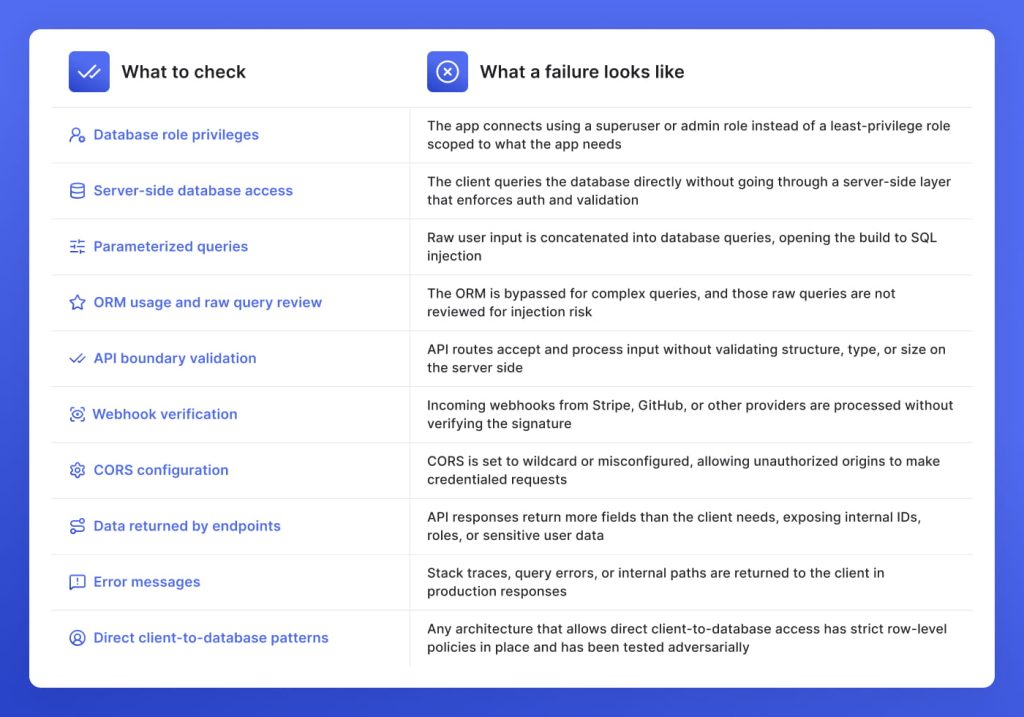
Checklist 4: What to audit in database and API access before a vibe-coded build goes live
Working output and safe output are not the same thing, and database and API access is where that gap costs the most. At GetDevDone, these are the checks that separate a production-ready build from one that is one request away from exposing client data.
Checklist 5: Every input your AI-generated build accepts is a risk until validated
Server-side input validation and output encoding are not features an AI tool adds by default. They are the difference between a build that is ready for real users and one that is not. Every surface below is an entry point until it is explicitly locked down.
Form fields and search boxes
User-submitted text reaches the server without schema validation or sanitization. The risk is XSS when that input is rendered back into the UI, and SQL or command injection when it reaches a query or system call. Enforce type, length, and format validation on the server.
CMS inputs and rich text
Content editors can submit malformed or malicious HTML through rich text fields. Output encoding must be applied before any CMS content is rendered, regardless of who submitted it. Treat every CMS input as untrusted until it has been sanitized.
URL parameters and query strings
URL parameters and query strings that feed into database queries, redirects, or template rendering without validation are an injection surface. Validate and whitelist every parameter that influences server behavior.
Webhook payloads
Incoming webhook data arrives without a user session but still reaches server logic. Validate the payload structure and schema on every webhook endpoint before any processing happens.
Uploaded filenames
Filenames submitted with file uploads are user input. An unsanitized filename that reaches a file system call or a database query is a command injection risk. Sanitize and randomize filenames server-side before storage.
LLM outputs and generated HTML
If the build renders LLM-generated content into the UI, that output is untrusted. Apply the same output encoding to AI-generated HTML as to any other dynamic content.
Checklist 6: File upload security for client portals and document intake builds before launch
Most agencies building document portals and intake forms focus on whether the upload works. What the file does after it lands, where it is stored, who can reach it, and whether the filename itself is a vector, those are the questions that do not get asked until something goes wrong. Answer every one of these before launch.
Are file size limits enforced server-side?
A client-side size limit stops an honest user and nothing else. Without server-side enforcement, anyone can send a request that bypasses the browser entirely and push files large enough to exhaust storage, spike costs, or take the service down.
Are file extensions and MIME types validated?
A renamed executable passes an extension check without difficulty. Without server-side MIME type validation, any file type can reach storage regardless of what the extension suggests, including files the portal was never meant to handle.
Is uploaded content stored outside executable paths?
A file stored inside the application directory that the server treats as executable turns every upload form into a remote code execution vector. Store all uploads in isolated private storage, never inside the app.
Are filenames randomized before storage?
A predictable filename is a navigable path. Without server-side randomization, an attacker can overwrite existing files by uploading with the same name or traverse storage by predicting how other clients named their documents.
Is access control enforced per file?
Bucket-level or folder-level access control is not enough when multiple clients share the same storage. Without file-level access control, an authenticated user who knows or guesses a file path can reach documents that belong to a different client entirely.
Are storage buckets private by default?
A public bucket means every client file the portal has ever stored is reachable by anyone with the URL, and file URLs are not hard to guess or enumerate. Every bucket holding client files must be private, with access granted only through signed URLs.
Are signed URLs used for file delivery?
A permanent public link to a client file does not expire when the client relationship does. Deliver every private file through a time-limited signed URL so access is revoked automatically when it should be.
Is malware scanning in scope?
For portals handling sensitive documents or regulated data, a single malicious file reaching internal storage can compromise the entire environment. Assess whether the risk profile of this build requires it.
Are deletion rules defined?
Retained files that outlive their purpose expand the breach surface and create compliance exposure. Define and enforce retention and deletion rules before launch, not after the client asks where their data went.
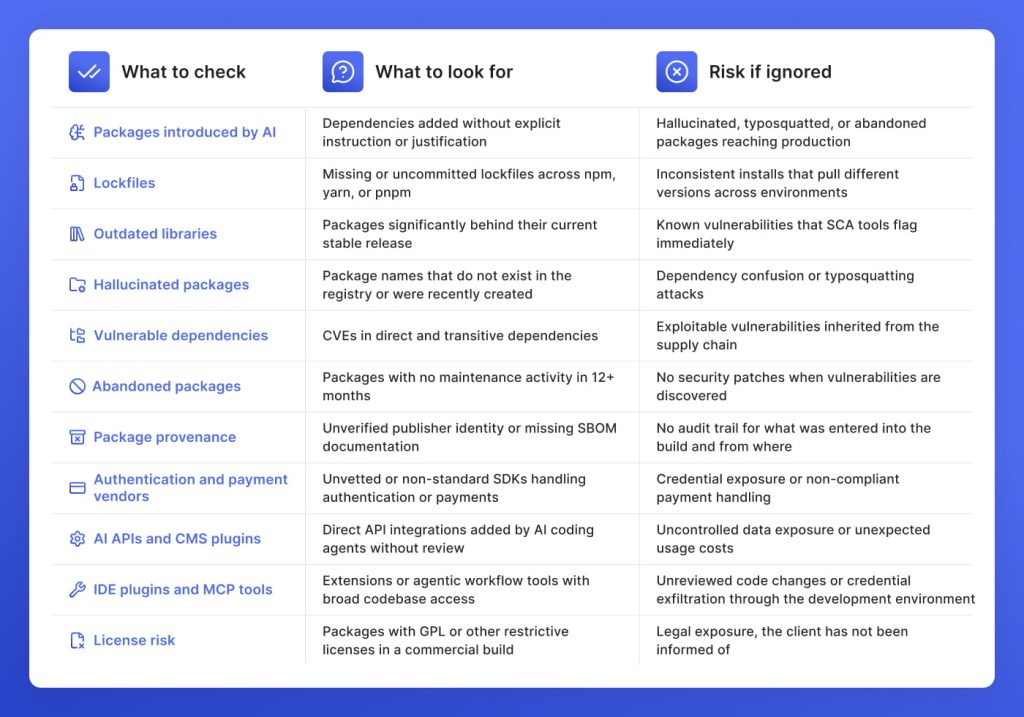
Checklist 7: Audit what the AI pulled into the build
Every package, SDK, plugin, and vendor integration in an AI-generated build was chosen by the AI, not by the agency. At GetDevDone, we have found hallucinated package names, abandoned libraries with open CVEs, and payment SDKs that were never vetted in builds that were days from going live.
Run this audit before the dependency manifest becomes the client’s problem:
Checklist 8: Security gates at every stage of the agency delivery workflow
Vibe coding removes delivery discipline by design. The speed is the feature, and the process is the casualty. Every security check below reintroduces a gate that should have existed from the start.
PR opened
Green tests confirm the feature works. They do not confirm that the new API route enforces authentication, that the package the AI introduced is legitimate, or that the server action added in the same commit has a defined scope. A human review at the PR stage catches what automated tests were never written to look for, and it catches it before the code reaches any environment the client can see.
CI runs
Secret scanning and SCA run automatically on every push. A commit that introduces a hardcoded key, a hallucinated package, or a dependency with an open CVE does not pass the pipeline. Configure this once and make it blocking.
Staging deployed
SAST runs against the full codebase and catches injection risks, insecure patterns, and logic flaws before they reach a live environment. DAST run against the staging instance finds what static analysis misses: auth enforcement gaps on live routes, misconfigured CORS, and endpoints that behave differently under real requests. Every API route, form, and file upload endpoint gets tested here. A staging environment that skips this step only delays where the failure surfaces.
Adversarial testing
QA confirms that the build works as intended. Adversarial testing confirms that it cannot be made to work in ways it was not intended. Modify IDs in live requests, bypass UI restrictions through DevTools, and attempt cross-tenant access with a second test account. Every gap this finds before launch is a client data exposure it prevents after it.
Pre-launch sign-off
A technical lead puts their name on a documented confirmation that every checklist in this audit has been completed. If something goes wrong after launch, the agency needs to demonstrate that a deliberate review happened. A dated sign-off attached to the delivery record is the difference between a defensible handoff and an open liability.
Launch
Production environment variables that differ from staging are the most common source of post-launch failures in AI-generated builds. Confirm every variable is set correctly for production, debug modes are off, error responses are suppressed so internal paths do not reach users, logging is active so incidents are investigable, and a rollback plan is documented before the domain goes live. A launch without a rollback plan is a launch without an exit.
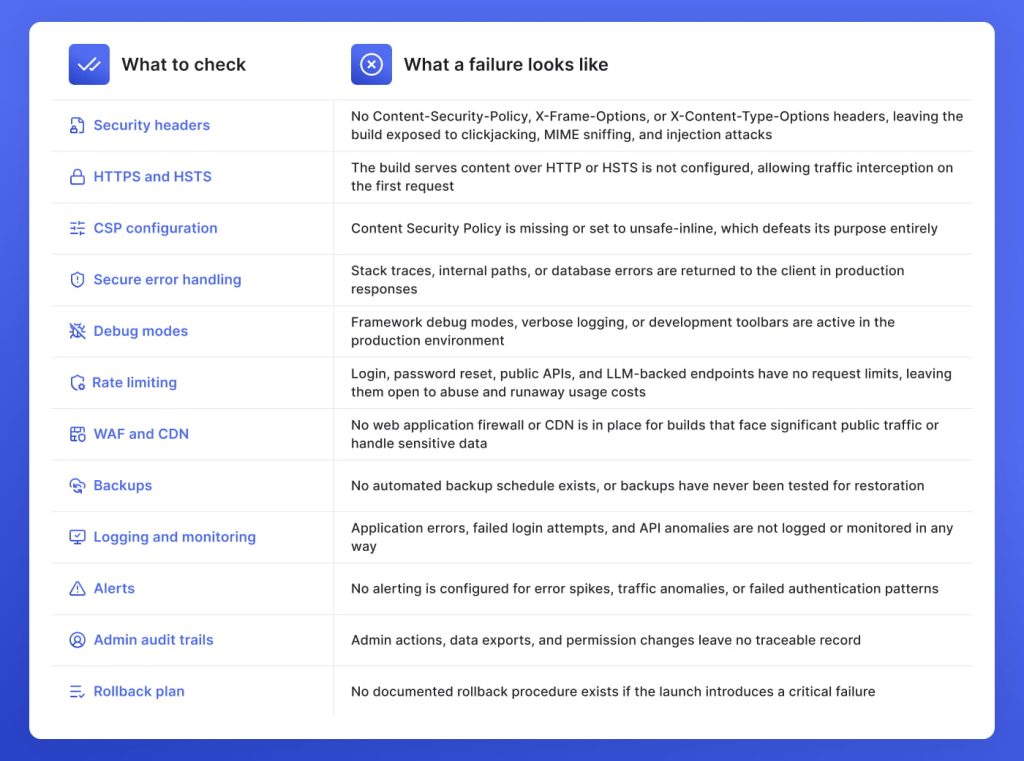
Checklist 9: What must be hardened before an AI-generated build touches a live client environment
An AI-generated build that passes every vibe coding security checklist above is still not production-ready until the environment it runs in is hardened. At GetDevDone, we run this hardening pass on every build before launch to ensure that a functioning build does not go live as an unsecured one:
Checklist 10: The handoff documentation a client will inherit
A secure build that cannot be supported after handoff is a liability the client has not discovered yet. At GetDevDone, every production-ready delivery includes the following documentation as a non-negotiable part of the handoff:
Architecture notes
A plain-language description of how the build is structured, what each major component does, and why key decisions were made. The next developer who touches the build without this starts from scratch every time, and the client pays for that orientation on every change request.
Environment variables inventory
A complete list of every environment variable the build requires, with descriptions of what each one does, without revealing the values. Without it, the client cannot rotate credentials, onboard a new developer, or redeploy without losing something.
Vendor list
Every third-party service, SDK, API, and plugin the build depends on, with account ownership and renewal responsibilities noted. A client who cannot identify their own dependencies cannot rotate a compromised credential, respond to a vendor deprecation, or transfer ownership of the build cleanly.
Data flows
A documented map of where user data enters the system, where it is stored, how it moves between services, and who has access to it. A client facing a data request, a breach notification, or a compliance audit with no data flow documentation is in an indefensible position before the conversation starts.
User roles and permissions
A clear record of every role in the system, what each role can access, and how roles are assigned and revoked. Offboarding a user or investigating an access incident without this documentation turns a five-minute task into a manual forensic exercise with no guaranteed outcome.
Deployment process
Step-by-step instructions for deploying, rolling back, and updating the build. A client attempting their first post-handoff deployment without documented steps is one wrong environment variable away from taking the production environment down.
Known limitations and technical debt
An honest account of what the build does not do, what was descoped, and what will need attention as the product grows. A client who discovers limitations after handoff through a failed change request will route that conversation back to the agency regardless of what the contract says.
Test results and audit trail
The output of every security check, QA pass, and pre-launch review conducted during delivery. If something goes wrong after handoff and no documented review exists, the agency has no position to defend and no evidence that the build was ever production-ready.
Maintenance responsibilities
A clear statement of what the agency will and will not maintain after handoff, and what the client is responsible for from day one. Every post-launch issue that lands without a defined ownership boundary turns into a scope negotiation that the agency has already lost.
After the audit: When to patch, rescue, or rebuild a vibe-coded website or portal
Once the audit is done, the gaps are documented, and the agency is sitting with a list of findings, the next question is what to do with the build itself.
Based on the production-readiness assessments and AI build rescue projects GetDevDone has completed, we use simple rules:
Patch when issues are isolated and the architecture holds.
Rescue when core flows work, but auth, data access, APIs, or dependencies need deliberate security hardening before the build is safe to ship.
Rebuild when security flaws are structural, the data model or permissions cannot be corrected without rewriting what sits on top of them, or the codebase breaks under every fix.
Most agencies we work with already know something is wrong before they contact us. What they do not know is whether the fix is a week of hardening or a full rebuild. Every day that question stays unanswered, the build stays live, the risk compounds, and the cost of the right answer goes up.
Agencies and brands that are unsure which approach to take can get a structured assessment through GetDevDone’s AI Engineering services before the build reaches production.
GetDevDone’s perspective
If the build is sitting in staging and the audit findings are longer than expected, the agency is at the moment where the decision matters most. Shipping anyway defers a risk that the client will eventually route back, and it will cost more to address after launch than before it. Pushing back on the timeline to harden auth, rotate exposed secrets, fix authorization gaps, and document what the client will inherit is not a delay. It is the delivery.
If the findings go beyond what the team can resolve without outside help, GetDevDone’s production-readiness assessments are designed for exactly this point in the project: before the domain goes live, not after something fails in production.
Not always, but they should be treated as untrusted until reviewed. AI-generated code often optimizes for working features, not for secure auth, database rules, safe dependencies, or maintainable handoff. For an agency, the practical risk is not that AI was used, but that the output may skip the review steps a production build normally receives.
Start with the highest-blast-radius items: secrets, authentication, authorization, database access, and file uploads. A visual bug can wait, but an exposed service key, missing RLS policy, or IDOR issue can expose client or user data immediately.
Scan the repository, commit history, environment files, logs, deployment settings, and frontend bundle for API keys, database URLs, tokens, and service credentials. If a real secret was committed or displayed client-side, assume it is compromised and rotate it rather than only deleting it.
Yes, scanners can catch many common issues, but they do not replace human review. SAST, SCA, DAST, and secret scanning are useful for hardcoded secrets, vulnerable dependencies, injection patterns, and unsafe code, while manual review is still needed for business logic, tenant isolation, and client-specific workflows.
AI can help find issues, but it should not be the final security authority. A useful workflow is to ask AI for a security review, then verify the output with automated tools and a developer who understands the stack, data model, and launch context.
Patch it when the architecture is sound and issues are isolated. Rebuild it when security problems are structural, the data model is wrong, permissions are tangled, dependencies are unsafe, or no one can maintain the code confidently after handoff.
It depends on the size and risk of the build. A focused first-pass review can often identify obvious launch blockers quickly, but a client portal with roles, uploads, payments, integrations, and production data needs a deeper audit, remediation, retesting, and handoff documentation.
Hand off the vendor list, environment variable map, data-flow notes, user roles, deployment process, test results, known risks, remediation notes, and maintenance responsibilities. This helps the client or future development team understand what was secured and what still needs monitoring.
The highest hidden cost is often rework. If AI-generated code uses the wrong auth model, exposes data directly from the client, or mixes business logic across files, the agency may spend more time untangling and rebuilding than it would have spent implementing the feature cleanly.
AI-generated code broke a Stripe and Memberstack integration in the payment system. See how GetDevDone diagnosed, reconciled, and fully restored the system.
Discover 7 tested signs your AI‑generated website build needs rescue before launch, and GetDevDone advice when it’s better to rebuild than keep patching
Bolt.new AI-generated prototype turned into a functional Shopify storefront with a custom Liquid theme, payments, inventory, and commerce infrastructure
Talk to a commerce advisor to define the right architecture, platforms, and growth model for your business.
Get guidance on configuration, scalability, and compliance — tailored to your market and goals.