AI-generated websites typically fail in production because critical backend logic, QA, security, performance, and maintainability requirements were never validated.
Backend gaps break forms, APIs, authentication, and integrations
Missing test coverage causes logic failures that users discover first
Front-end bloat slows pages and damages Core Web Vitals
Security weaknesses expose data, systems, and compliance risks
Poor architecture increases maintenance costs and handoff complexity
The fastest path to vibe code cleanup and recovery is structured triage: patch what is stable, rebuild what is risky, and remove technical debt before it compounds.
Why AI-built websites fail in production
Your client’s AI-built site looked done at launch. Now it’s throwing errors, breaking on mobile, and nobody on the team can touch the codebase without something else snapping. Vibe coding problems show up when real users hit the thing, and the AI coding technical debt starts compounding fast. Based on the projects we’ve handled at GetDevDone, five AI-built website failures come up most. Here’s how to get each one to production readiness before the client loses confidence.
Nobody flags AI-generated code bugs because nothing looks broken. The site looks done, and it’s a trap. It passes a visual check, the client approves it, and the performance bottlenecks, the broken error handling, and the AI-built website issues that nobody tested all go live together. By the time something crashes, the team that built it is already off the project.
Your AI-built site is breaking: Patch, rescue, or rebuild?
Before touching a single line, you need a production-readiness assessment. From our experience, the wrong call here doubles the budget and the timeline.
Start your code audit here:
Repository structure and commit history
Build logs and error output
Hosting and environment configuration
Dependency versions and conflicts
CMS data model (WordPress, Webflow, Shopify)
Core user flows: auth, forms, checkout
Table 1: How marketing agencies should triage AI-built website failures
Quick Patch
Rescue Sprint
Partial Rebuild
Full Rebuild
Timeline
Hours
Days
Weeks
Full reset
When
Configuration errors, minor front-end bugs, broken environment variables
Unstable modules, missing QA, React, or Next.js components that fail under real conditions
Forms, checkout, auth, CMS templates, API integrations that were generated but never properly implemented
Architecture is unsafe, codebase is unmaintainable, or salvage vs partial rebuild vs full rebuild math doesn’t work
Condition
No critical errors in build logs, dependencies resolve cleanly, structure is navigable
Build succeeds, core pages load, but key modules fail in production
Structural failures are scoped to specific features, not the entire codebase
Common with AI-generated Next.js or React projects, where component logic is hardcoded into every layer
Action
Fix and ship
Isolate the failing modules, rebuild them with proper error handling and testing, regression-test everything else
Strip what failed the audit, rebuild to production requirements, keep what holds
Production killer 1: The back-end path is missing, misconfigured, or fake
The client ticket says “the form stopped working.” Opening the codebase, the authentication and authorization logic is sitting inside a React component. The API routes return 200 and write nothing to the database.
Nobody documented the missing environment variables and secrets because the developer who generated the code never set them up properly. Back-end completion and cleanup on AI-built projects start with mapping every point where server-side logic should exist but does not. Most of the time, that list is longer than the client expects.
Back-end audit checklist for AI-built projects
Running QA after the build is too late on AI-built projects. By the time a broken integration surfaces in production, the staging environment was never set up, and the logs were never wired.
Table 2: AI-built site back-end audit checklist for agencies
What to audit
How to fix
Configuration audit
Pull every environment variable, verify each one exists in production, remove hardcoded values
Secrets cleanup
Rotate any token or key that touched the client, move everything to the server-side environment
Server-side validation
Every form input, auth check, and API call validated on the server, not in the component
Test submissions
Run real submissions end-to-end: form delivery, database write, error response
Staging checks
Mirror production exactly, no shortcuts, no missing integrations
Logs around critical integrations
Every payment, authentication event, form submission, and API call logged with failure states covered
Production killer 2: Happy-path logic passes, but real users break it
Explaining a wrong result to a client is harder than explaining a crash. AI-generated code bugs do not always throw errors, which means the code runs perfectly and delivers the wrong outcome with no indication that anything failed. A booking flow accepts past dates the same way it accepts valid ones. A pricing calculator returns a number, just the wrong one.
Happy-path testing misses these issues because no alternative scenarios were tested. Silent logic failures are the hardest to triage because there is no error, log entry, or obvious moment when something broke.
QA hardening for silent logic failures
Silent logic failures do not respond to code fixes. They respond to test coverage that was never written in the first place. Before touching the codebase, map every business-critical flow and write acceptance criteria for what correct means.
Table 3: QA hardening checklist for AI-built sites
Edge case pricing, discount stacking, failed payment states, order confirmation logic
Search
Empty results, special characters, filters that return wrong sets
Authentication
Expired sessions, role boundaries, unauthorized access to protected routes
CMS publishing
Empty optional fields, unpublished content references, broken template states
Acceptance criteria before any flow goes live:
define the correct result
test the empty state
test the slow state
document every error handling scenario
Business logic generated without test coverage must be manually validated.
Production killer 3: Security gaps stay hidden until the client gets the bill
Exposed API keys and hard-coded secrets are the most common security issues on AI-built projects, and the easiest to miss during a visual review. Hallucinated dependencies are the least obvious: the model references a package that does not exist, a similarly-named malicious package fills the gap, and it goes live.
Input validation gets skipped because the happy path never triggers an injection attempt, which means XSS and SQL injection risk sit in contact forms, payment flows, and authentication routes untouched. Insecure defaults, exposed stack traces, and outdated APIs compound the exposure without throwing a single visible error.
None of this surfaces in a demo, and none of it is GDPR or legal compliance-friendly when a client’s user data is involved.
AI-built site security hardening: What agencies check
Security hardening on AI-built projects starts before any code review. Static analysis and secret scanning take an hour and surface the issues that would otherwise cost the client a breach, a fine, or both.
Secret scanning: find and rotate every exposed API key and hard-coded secret
Dependency verification: confirm every package exists, is maintained, and matches what was intended
Static analysis (SAST) and linting: run automated analysis across the full codebase
Access control review: verify every route, endpoint, and data access point has server-side authorization
Input validation: sanitize every user input on the server, with no exceptions for contact forms, search, or file uploads
Error handling: strip stack traces and internal references from every public-facing error response
Manual QA review: go through authentication flows, payment integrations, and data access logic
Production killer 4: Your front-end loads fine on your machine, but crashes on the client’s
Script bloat on AI-built front-ends is not always visible. The bundle ships with duplicate libraries, conflicting React and CDN versions, and animation scripts nobody audited. Core Web Vitals scores collapse under the weight of uncompressed media and oversized JavaScript before a real user clicks anything. On a mid-range Android device, repeated API calls build memory pressure until the tab freezes or the browser kills the page. Real-device testing is the only way to catch this because no desktop browser replicates what happens on a client’s phone.
Front-end performance cleanup for AI-built sites
Run Lighthouse and WebPageTest before touching anything. Document the baseline, set performance budgets per critical template, and treat anything that exceeds them as a blocker. Dependencies cleanup, code splitting, image optimization, and bundle analysis come after you know what you are dealing with.
The first Lighthouse run on an AI-built site is always the most honest conversation you will have about the project. Real-device QA on a mid-range Android tells you what the desktop never will. Run both before touching a single dependency, because performance budgets set after the audit are the only ones that hold.
Production killer 5: Working code nobody can maintain or hand off
The site launched, the client is happy, and six weeks later, nobody can add a new page without something breaking. Components have names like Component1, logic is duplicated across files with no explanation, and the CMS implementation has no editing model that the client can actually use. Documentation and handoff recovery on these projects means starting from scratch because comprehension debt accumulated from day one. AI coding technical debt is a codebase where every small change requires a full investigation just to understand what the original decision was. Maintainability determines whether the next developer can work on the project.
How agencies fix maintainability on AI-built projects
At GetDevDone, we recommend agencies and brands start architecture cleanup and refactoring with the modules that break most often. Naming and folder structure get normalized so the next developer does not need a guided tour to make a change. Every hard-coded value that should be editable gets converted into a CMS field. Handoff notes cover setup, decisions, and known limitations so future support does not start from scratch.
A clean CMS setup and documented decisions determine whether the next developer can own the codebase or survive it. Without that, every post-launch request becomes an investigation.
GetDevDone’s perspective
Vibe coding problems follow patterns. After enough AI coding technical debt cleanups, rescue sprints, and partial rebuilds, the recovery sequence becomes a process. The fastest path to production readiness is structured triage: fix what is fixable, rebuild what is unsafe, and document what the next developer will inherit.
Agencies and brands turn to GetDevDone for AI engineering services, from bringing AI-generated prototypes to production to rescuing unstable builds and completing partial implementations. The ones that come in early get a scoped fix. The ones that come in after the client has already seen the failures get a much harder conversation about timeline, budget, and what was shipped.
The next step is the same regardless of where the project stands: audit the build before more changes get layered on top.
AI-generated websites are made stable, scalable, and SEO-ready
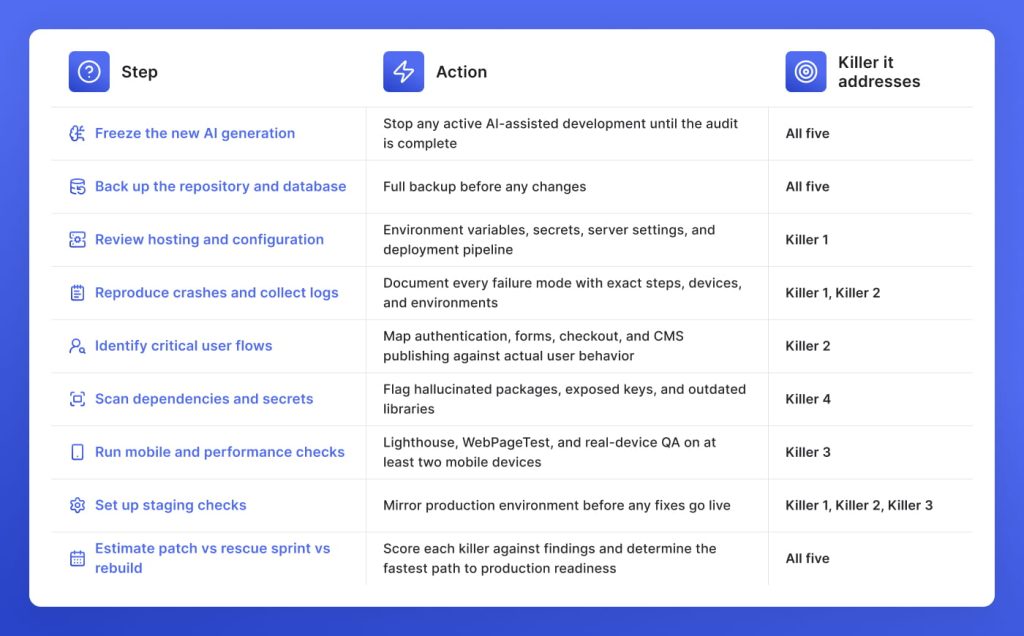
First recovery pass: What agencies do in the first 48 hours on an AI-built project
Every hour spent fixing the wrong thing on an AI-built project adds to the bill the client was not expecting. The first recovery pass exists to make sure the right things get fixed in the right order.
FAQ: Vibe coding problems
The most common vibe coding problems are missing back-end logic, weak error handling, dependency conflicts, exposed secrets, and performance bloat. In agency projects, these usually appear when a prototype is treated like a production build without a proper audit, QA pass, and handoff process.
AI coding technical debt appears because visible output is not the same as maintainable implementation. A page can render correctly while the code has duplicated logic, missing edge-case handling, weak architecture, or no clear reason behind key decisions.
An AI-built website can often be fixed if the structure is understandable and the risky parts are isolated. A rebuild is usually safer when authentication, payments, CMS architecture, data handling, or core templates are unstable across the whole build.
The agency should first reproduce the crash, check the hosting and environment configuration, review console and server logs, and test the critical user flow that failed. After that, inspect dependencies, secrets, API calls, forms, and recent AI-generated changes.
AI-generated code bugs are often different because they can look clean and confident while missing project-specific context. Developers still see familiar bugs, but AI output tends to repeat patterns such as happy-path logic, missing edge cases, inconsistent naming, and unsafe defaults.
It is only safe after human review, security checks, and real workflow testing. Forms, payments, authentication, and data access should never rely on unreviewed AI output because small mistakes can create privacy, security, or client-trust problems.
The hidden costs are usually debugging time, rework, delayed launch, extra QA, poor handoff, and future maintenance risk. For agencies, the higher cost is often client confidence when a site looks approved, but cannot survive production checks.
The handoff should document setup steps, environment variables, dependencies, CMS structures, deployment flow, known limitations, critical user flows, and why major technical decisions were made. This reduces future support risk when the original AI prompts and assumptions are no longer available.
Discover 7 tested signs your AI‑generated website build needs rescue before launch, and GetDevDone advice when it’s better to rebuild than keep patching
Talk to a commerce advisor to define the right architecture, platforms, and growth model for your business.
Get guidance on configuration, scalability, and compliance — tailored to your market and goals.