AI-generated websites should be patched only when issues are isolated; recurring failures, unreadable code, or architectural limitations usually indicate the site needs a structured rescue or a rebuild instead of more fixes.
Audit the entire AI-generated build the code is readable, and fixing one problem does not create another
Rescue an AI-generated website when the same issues keep returning, real content or user testing exposes new failures, or developers cannot confidently explain how the build works
Rebuild an AI-generated website when the code cannot be maintained, version-controlled, exported, or handed off without major rewriting
Recurring layout breaks, demo-only functionality, performance issues, regression after manual edits, unreadable code, and integration limits mean patching is the wrong approach
The moment real content, real users, or a live update hits an AI-generated website build, demo-mode stability is over. That gap between what worked in preview and what holds in production is exactly where agency margins go. This piece helps you identify where an AI-generated build actually sits: still patchable, in need of structured rescue, or better replaced than repaired.
Patchable, rescue, or rebuild: Making the call before it makes itself
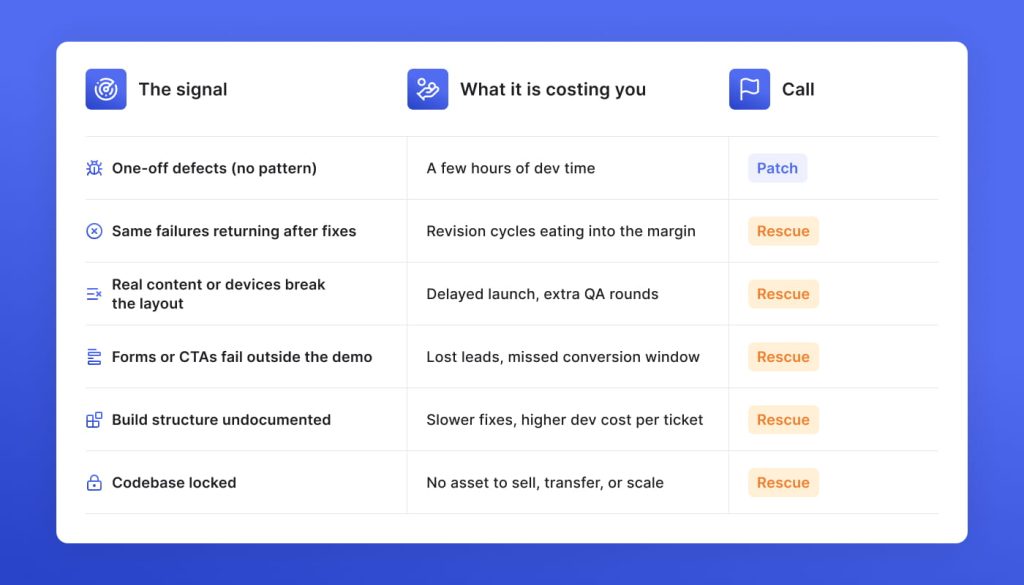
A build is patchable when its failures do not share a root cause. The moment fix cycles start repeating, it’s not an option. In our own experience in AI engineering services, that line is usually crossed well before the agency recognizes it.
What still counts as patchable
The defects are isolated and don’t share a root cause. Fixing one issue doesn’t introduce instability elsewhere in the build. The codebase is readable enough that a developer can locate, understand, and resolve the problem without reverse-engineering the surrounding logic.
What changes the diagnosis to rescue
The same types of failures reappear after each round of fixes. Real content, device testing, or user flows expose breaks that the demo never surfaced. No single developer on the team can give a confident account of how the build is structured.
What forces a rebuild
The code cannot be exported, version-controlled, or handed to another developer without significant rewriting. The original AI-generated output is so entangled that every fix creates new failure points. Ownership of the build cannot be established or transferred cleanly.
Rescue sign 1: The build never met real content
AI-generated builds are constructed around assumptions that headlines will be a certain length or images a certain size. They hold as long as the content is controlled. The moment a client loads a real copy, the structure has no way to absorb the variance it was never designed for. Every layout failure is an assumption that real content just disproved.
Responsive layout failures under real content aren’t a CSS problem. They point to a front-end structure that was never load-tested against actual data, copy lengths, or device behavior. Fixing the visible break without addressing the underlying fragility guarantees the next one.
Rescue sign 2: Interactions that only work in demo
The client signed off on a demo, not a product. The difference is that the demo never encountered a real user doing something unexpected. AI-generated builds are wired for the happy path, which means every interaction holds until it meets actual behavior. By the time broken forms and dead CTAs surface in QA, the agency is standing between a client who believes the build is ready and a product that has never proved it.
Rescue sign 3: Performance problems that go all the way down
In AI-assembled builds, performance was whatever the output happened to produce. Fix cycles on these builds consume developer hours without moving the metrics, because each patch addresses a symptom of a structure that wasn’t designed to perform. By the time LCP is still above 2.5 seconds after three rounds of fixes, the agency is deeper in the build than when they started. The client’s ad spend has been eroding the whole time.
Rescue sign 4: The build goes live, and nobody owns the risk
There is no decision log in an AI-generated build. Forms route somewhere, cookies fire, admin access exists, but no human made a conscious architectural choice about any of it. A pre-launch security review assumes someone made decisions worth auditing. GDPR requires unaccounted data handling to create liability. In a build where the answer to “why is it set up this way” is silence, unaccounted data handling is the default.
Rescue sign 5: The build stops cooperating after manual edits
The internal logic of an AI-generated website was never documented because nobody designed it. The first manual edit disturbs that logic. The second fix addresses the consequence of the first. By the third round, the agency is spending more time managing regressions than delivering work. Plugin conflicts, CMS workflow breaks, and theme incompatibilities are the same problem: a structure that was never meant to be modified in parts. The agency loses time here faster than anywhere else because every hour spent looks like progress and almost none of it is.
Rescue sign 6: The codebase is operationally unreadable
Human-written code has intent behind it: decisions a developer can read, follow, and build on. AI-generated code has output. It works, but it does not explain itself. No consistent patterns or structure that reflect how the build actually functions. At GetDevDone, we have found that this hits hardest when the first real change request comes in. Every developer who touches it starts from scratch. The agency pays for that orientation every single time.
Rescue sign 7: The site cannot scale into the client’s stack
A build that cannot be exported, integrated, or extended becomes a liability the client has not yet fully discovered. CMS limitations surface when the content team tries to work independently. Vendor lock-in surfaces when the client asks for a CRM integration that the platform doesn’t support. No export path means no negotiating position: the client is committed to whatever the platform decides to change, deprecate, or reprice. At this point, the launch is a deferral of the rebuild conversation the agency will eventually have to lead.
How a structured rescue works when the build is already broken
Rescue projects fail because the first fix went in before anyone read the build as a whole. The sequence matters more than the speed.
When something goes wrong, the instinct is to act on visible symptoms and build a patch queue around them. At GetDevDone, AI-based build rescue starts one level deeper. We map what’s causing the symptoms before anything gets touched.
Read the build before touching it
Before any fix goes in, we advise mapping what the build actually does against what it was supposed to deliver. Without that picture, each fix risks breaking something the demo never surfaced.
The cost of rescue vs. rebuild before work starts
Salvageable components are identified before any work begins, so the agency can make a conscious decision, rather than discovering mid-project that the scope has changed.
Business impact decides the fix sequence
Most fix sequences follow the path of least resistance. Stabilization should be sequenced by business impact: what costs the agency most to leave broken goes first, regardless of complexity.
Selective rebuild as a scoped decision
Where the foundation cannot support what the client actually needs, a partial rebuild gets scoped before stabilization work begins. The rebuild boundary is a defined line.
Documentation that survives the handoff
Every rescue produces documentation of the decisions made during stabilization. The next developer who touches this has a starting point.
GetDevDone rebuilt a Lovable-generated marketing site from production-broken to launch-ready in 3.5 weeks
An agency inherited a Lovable build that their client expected to go live. It was visually complete and production-broken. GetDevDone audited, scoped, and rebuilt it in Next.js without touching the design.
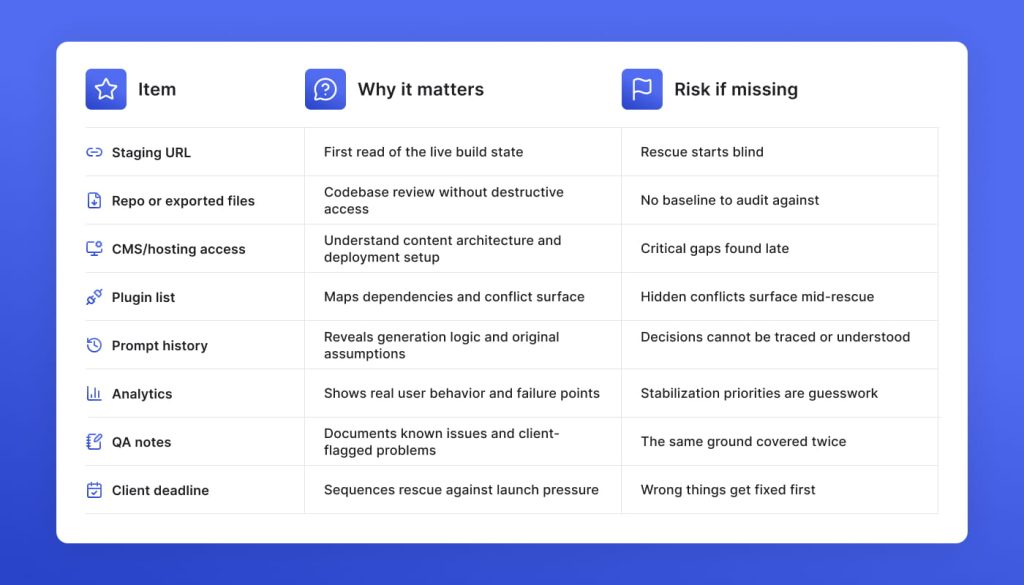
8 handoff items that separate a fast rescue from an expensive one
The fastest rescue projects start with access. Every day spent chasing credentials or reconstructing context is a day not spent stabilizing the build and smooth delivery.
GetDevDone’s perspective
Often, rescue projects reach us later than they should. Agencies hold unstable builds in-house because they expect to hear that everything needs to be rewritten, the timeline expanded, and the budget changed. That fear keeps the build inside the agency, and the longer it stays, the more it costs to hand over. The right rescue partner does the opposite: tells the agency what holds, what needs stabilization, and what can be delivered now. The agency does not get a new problem. It gets an answer.
A cleanup fixes one thing without touching anything else. Rescue is what the build needs when the same categories of failure keep returning after each fix cycle. Repeated layout failures, broken forms, and unstable edits are not isolated problems. They share a root cause, which the patch queue is not reaching. Each patch creates more unknowns. At that point, the agency is not cleaning up. It is absorbing a foundation problem one ticket at a time.
Often, yes. A full rebuild is necessary when the platform cannot support what the client actually needs, or the code cannot be exported and governed. When the code is accessible and the platform is workable, stabilization is usually the faster and cheaper path. At GetDevDone, most rescue engagements resolve without a full rebuild. What changes are the structure, the documentation, and the confidence the agency can stand behind in its delivery.
The visible build is rarely what determines the cost. Two sites that look identical in demo can have completely different rescue scopes depending on whether the code is exportable, the platform is workable, and how much of the build is salvageable without rewriting. The agencies that get accurate quotes fastest are the ones that come in with repo access, a plugin list, and QA notes. Without that, the first week of rescue is spent on discovery that should have happened before the quote.
It depends on where the build actually sits. Triage and stabilization of a patchable build can move in days. Selective rebuild alongside stabilization takes weeks. Full replacement is a totally different conversation. At GetDevDone, the fastest rescue projects share one thing: the agency came in with staging access, a blocker list, and enough context that the first week was spent fixing, not discovering. A live solution is not the same as stable, and the gap between the two is what determines the timeline.
The invoice is not where the cost shows up first. It shows up in QA rounds that keep reopening, launch dates that keep moving, and developers who spend the first hour of every ticket just orienting in a codebase nobody fully understands. By the time the agency calculates what the patch queue has actually cost, the margin on the project is gone, and the client relationship is strained. The build looked launched. It was never production-ready.
Yes, and most rescue projects arrive exactly that way. Undocumented builds take longer to audit because the first step is reconstructing what the build was supposed to do before anyone can assess what needs to change. That additional discovery affects scope and timeline, which is why GetDevDone asks for whatever context exists: QA notes, prompt history, plugin lists, before scoping the engagement. The less context available on day one, the more of the budget goes to orientation instead of stabilization.
The audit produces a decision, on top of a written report. At GetDevDone, the output is a clear split: what can be patched before launch, what needs structural stabilization, what should be partially rebuilt, and what can wait until after go-live. The agency enters the next phase knowing the scope, the sequence, and the cost.
How to capture agency’s margins and client retention with a marketing technology partner. Real numbers and tips on how to scale delivery and stay relevant and safe.
Lovable AI prototype became a production WordPress site with editable Gutenberg blocks, real forms, and SEO, delivered in 3 weeks for a digital agency.
Headless CMS for enterprises: buyer's guide to top scalable platforms for high-traffic, multi-team ops with proven architecture, pricing tiers, and rollout plan
Talk to a commerce advisor to define the right architecture, platforms, and growth model for your business.
Get guidance on configuration, scalability, and compliance — tailored to your market and goals.